CellModelBlock
R2026bDescription
Use CellModelBlock to construct the
CellModelOptions property of a Cell object. This
property contains the conditional parameters of the block that you specify in the
CellModelBlockPath property.
By default, the CellModelBlockPath property uses the Battery Equivalent
Circuit block, but you can also use the Battery
(Table-Based) block or specify your own custom block. For more information,
see the CellModelBlockPath property.
Note
A generated battery block always uses the default values of the parameters in the
battery cell blocks that you specify in the CellModelBlockPath property
of your battery object, regardless of how you modified them. The only parameters of the cell
block that you can modify are the conditional parameters listed in the
BlockParameters property.
Creation
Description
Note
To quickly create a CellModelBlock
object, use the batteryCellModelBlock function. By using this function, you avoid importing
the namespace, using the full class name, or dealing only with name-value arguments when
creating the object. (since R2024a)
To create a CellModelBlock object without using
the batteryCellModelBlock function, at the MATLAB® Command Window, you must run this command at least once each MATLAB session:
import simscape.battery.builder.*;
cellModelOpt = CellModelBlockCell object. To modify these options for your
application, use dot notation.
Properties
Library path to a Simscape battery cell block, specified as a string. The default component model block is the Battery Equivalent Circuit block.
You can also use the Battery (Table-Based) or specify your own custom cell block, as long as your custom block meets all of these requirements:
The custom block must provide exactly two electrical conserving ports named n and p.
All variables must be scalar-valued.
The custom block cannot contain a variable or intermediate variable called power_dissipated.
You can connect the custom block to any number of thermal nodes. The software connects all nodes in parallel.
If you specify your own custom block, the fields of the BlockParameters
structure depend on the parameters that you specified inside your custom block. To
modify these options for your application, use dot notation.
For more information on how to build a battery model from a custom cell component, see the Build Battery Model from Custom Cell Component example. (since R2026a)
Input and Output Ports of Custom Blocks
Generated battery blocks that use a custom block as cell model block expose the same input ports (since R2026a) and output ports (since R2024b) of the custom block. Inputs and outputs are concatenated horizontally and they are physical signals for Parallel Assembly and Module generated blocks and Simulink® signals for Module Assembly and Pack generated blocks.
Note
Generated battery blocks do not expose untyped inputs. For more information about
component inputs, see inputs.
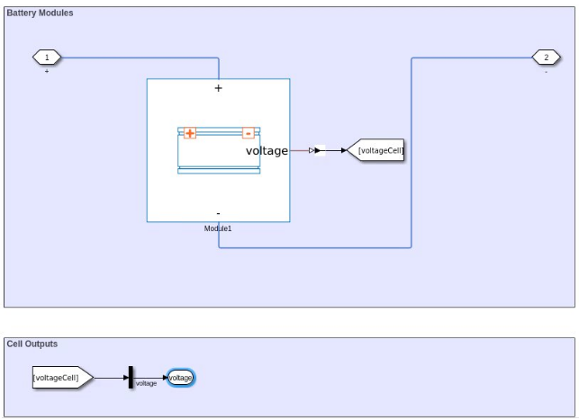
For example, create a custom cell block with a voltage output port:
% ...
    outputs
        voltageCell; %voltage
    end

    equations
        voltageCell == [ParallelAssembly1(:).voltageCell]';
    end
% ...
Cell,
ParallelAssembly, Module, and
ModuleAssembly objects and generate the ModuleAssembly block by
using the buildBattery function. Then, the generated ModuleAssembly
block exposes the voltage port:
Conditional parameters of the cell block that you specify in the
CellModelBlockPath property. These conditional parameters control
the visibility of the component members of the cell block, such as parameters,
variables, nodes, inputs, and outputs.
Note
This property does not include the run-time parameters of the specified cell block.
These are the conditional parameters for the Battery Equivalent Circuit block:
CurrentDependence— Current dependence for resistance parametersSelfDischargeResistor— Self dischargeRCPairs— Parallel resistor capacitor pairsCyclingAgingMethod— Cycling aging modelCalendarAgeResistance— Resistance calendar agingCalendarAgeCapacity— Capacity calendar agingThermalModel— Thermal modelHysteresisModel— Hysteresis modelReversibleHeatModel— Reversible heat modelCalendarAgingMethod— Modeling optionStorageVariable— Storage condition
These are the conditional parameters for the Battery (Table-Based) block:
T_dependence— Tabulate parameters over temperaturethermal_port— Thermal portprm_age_OCV— Storage conditionprm_age_capacity— Capacity calendar agingprm_age_resistance— Internal resistance calendar agingprm_age_modeling— Modeling optionprm_dyn— Charge dynamicsprm_dir— Current directionalityprm_fade— Fade characteristicprm_leak— Self-discharge
If you specify a custom block in the
CellModelBlockPath property, these fields might differ.
Example:
cellModelOpt.BlockParameters.thermal_port = "model"
Since R2024a
This property is read-only.
Flag that states whether the cell block exposes at least one thermal node, returned
as true or false. To change
conditionally exposed thermal nodes, update the relevant properties inside the
BlockParameters property.

