Model dependencies
R2026bData and design files that potentially impact simulation results
Model Configuration Pane: Model Referencing
Description
The Model dependencies configuration parameter lets you specify data and design files that the software does not automatically identify as dependencies.
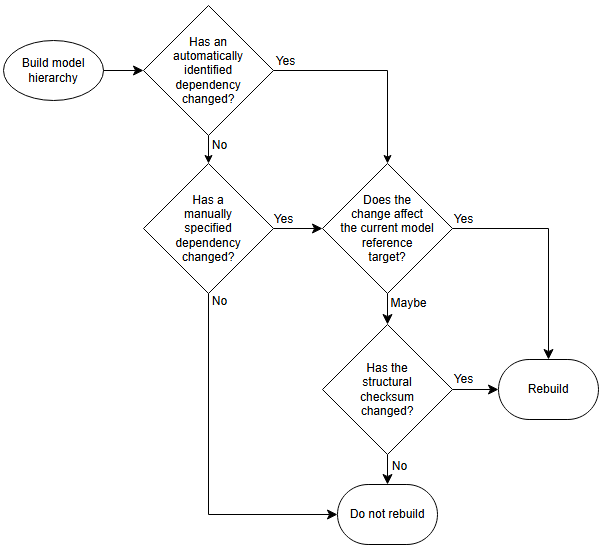
The software rebuilds the model reference targets only when:
A dependency automatically identified by the software has changed, and the change affects the current model.
A dependency manually specified by the Model dependencies configuration parameter has changed, and the change affects the current model.
When needed, the software determines whether the change affects the current model by checking whether the structural checksum has changed.
This flow chart visualizes how the software determines whether to rebuild model reference targets during model compilation, simulation, and code generation.
Determine Dependencies to Specify
To prevent invalid simulation and code generation results, specify files that contain code executed by callbacks.
You do not need to specify automatically identified dependencies and derived files, such as:
Referenced subsystems and models.
Model reference simulation targets.
Model reference coder targets.
Simulink® cache files.
Linked libraries.
Global variables.
Model workspace, when its data source is a MAT file or MATLAB® script or function.
Data dictionaries.
Enumerated type definitions.
Custom S-functions and their TLC files.
External files used by Stateflow® charts, MATLAB Function blocks, MATLAB System blocks, C Caller blocks, C Function blocks, and similar.
Dataflow subsystems — Analysis of dataflow subsystems requires that the simulation target rebuilds to profile and rebuilds again to partition the subsystem. In addition, the simulation target must rebuild if the machine running the simulation has fewer cores than the subsystem is partitioned to use, for example, if the simulation target was last built on a machine with a greater number of cores. For more information, see Simulation of Dataflow Domains (DSP System Toolbox).
To help identify model dependencies, use the Dependency Analyzer. For more information, see Analyze Model Dependencies.
If the software cannot find a manually specified dependency when you update or simulate a model that references this model, the software displays a warning.
Set Configuration Parameter for Referenced Models
In a model reference hierarchy, whether you edit the parameter in the top model or the current referenced model depends on how you access the Configuration Parameters dialog box.
Top model in the current model hierarchy — In the Simulink Toolstrip, on the Modeling tab, click Model Settings.
Current referenced model — In the Simulink Toolstrip, on the Modeling tab, click the Model Settings button arrow. Then, in the Referenced Model section, select Model Settings.
Alternatively, open the referenced model as a top model. Then, in the Simulink Toolstrip, on the Modeling tab, click Model Settings.
Dependencies
To enable this parameter, set Total
number of instances allowed per top model to One or
Multiple.
Settings
'' (default) | character vector | cell array of character vectorsSpecify dependencies as a character vector or cell array of character vectors, where each cell array entry is one of these values:
Filename — The software looks on the MATLAB path for a file with the given name. If the file is not on the MATLAB path, specify the path to the dependent file. The filename must include a file extension, such as
.m.Path to the dependent file — The path can be relative or absolute and must include the filename.
Folder — The software treats every file in that folder as a dependent file. Files of subfolders of the folder you specify are not included.
Cell array entries can include:
Spaces
The token
$MDLas a prefix to a dependency to indicate that the path to the dependency is relative to the location of this model fileAn asterisk (
*) as a wild cardA percent sign (
%) to comment out a lineAn ellipsis (
...) to continue a line
This example shows valid cell array entries.
{'D:\Work\parameters.m', '$MDL\mdlvars.m', ...
'D:\Work\masks\*.m'}
Examples
Recommended Settings
| Application | Setting |
|---|---|
| Debugging | No impact |
| Traceability | No impact |
| Efficiency | No impact |
| Safety precaution | No recommendation |
Programmatic Use
Parameter:
ModelDependencies |
| Type: character vector |
| Value: any valid value |
Default:
'' |
More About
Version History
Introduced before R2006a

