Data Store Write
R2026bWrite data to data store
Data Store Write block

To add a block to a model, double-click the canvas and start typing the block name. Then, select the block from the list.
Libraries:
Simulink /
Signal Routing
Description
The Data Store Write block copies the value at its input to the named data store. Each write operation performed by a Data Store Write block writes over the data store or a selected portion thereof and replaces the previous contents.
The data store to which this block writes is determined by the location of the Data Store Memory block or signal object that defines the data store. For more information, see Data Stores and Data Store Memory. The size of the data store is set by the signal object or the Data Store Memory block that defines and initializes the data store. Each Data Store Write block that writes to that data store can write up to the amount of data in the data store.
More than one Data Store Write block can write to the same data store. However, if two Data Store Write blocks attempt to write to the same data store during the same simulation step, results are unpredictable.
Obtaining correct results from data stores requires ensuring that data store reads and writes occur in the expected order. For details, see Order Data Store Access and Data Store Diagnostics.
You can log the values of a local or global data store data variable for all the steps in a simulation. For details, see Log Data Stores.
You can select a Data Store Read, Data Store Write, or
Data Store Memory block to highlight blocks related to it. To show a
related block in an open diagram or new tab, pause on the ellipsis that appears after
selection. Then, select Related Blocks  from the action bar. When multiple blocks correspond
to the selected block, a list of related blocks opens. You can filter the list of
related blocks by entering a search term in the text box. After you select a related
block from the list, window focus goes to the open diagram or new tab that shows the
related block.
Element Assignment tab is not supported when the Data
Store Write block writes to a Data Store Memory block with
the Dimensions parameter value set to Inf. In
other words, the data store is set to accept unbounded variable-size signals.
Examples
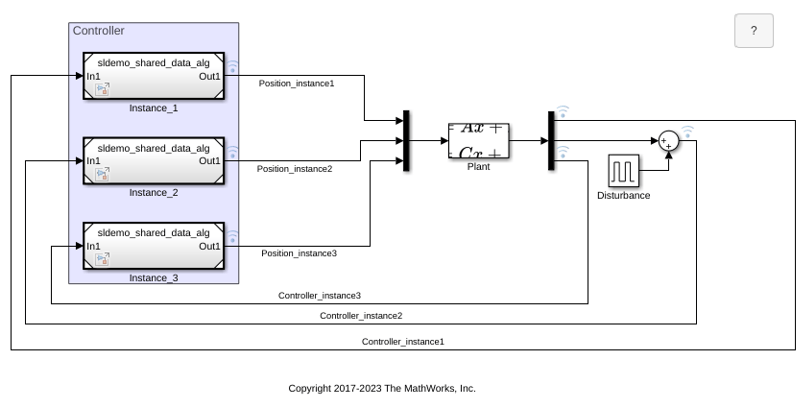
Share Data Among Multiple Instances of a Reusable Algorithm
Use a Data Store Memory block to share data among multiple instances of an algorithm in a model.
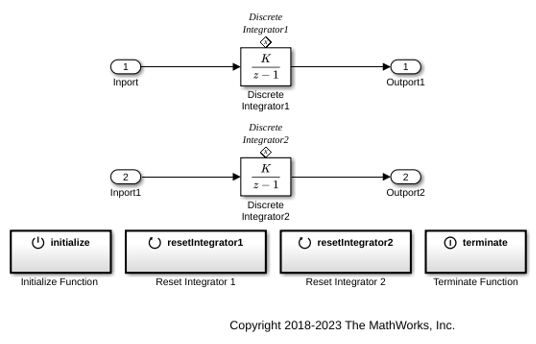
Initialize, Reset, and Terminate State of Simulink Block
Use the Initialize Function, Reset Function, and Terminate Function blocks to respond to events in a Simulink model.
Ports
Input
Parameters
Block Characteristics
Programmatic Use: Add Block
To add the block programmatically, use the add_block function with one of these library block paths as the source.
"simulink/Signal Routing/Data Store Write"
Example: add_block("simulink/Signal Routing/Data Store Write","myModel/myBlock",MakeNameUnique="on")

