DateTime to Formatted String
R2026bDateTime to Formatted String block
To add a block to a model, double-click the canvas and start typing the block name. Then, select the block from the list.
Libraries:
Simulink /
DateTime
Description
The DateTime to Formatted String block converts a DateTime signal data type to a
formatted string.
Examples
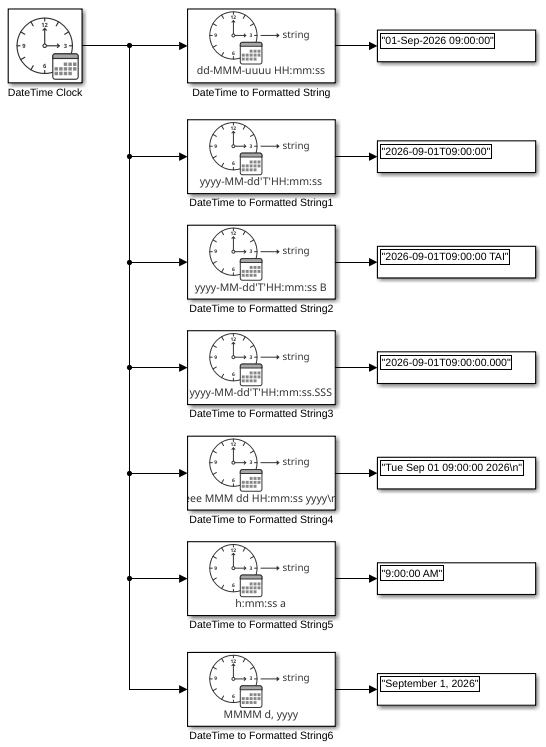
This example shows the result of each default format for the DateTime to Formatted String block being applied to a DateTime signal. The input for all DateTime to Formatted String blocks in the model is a DateTime signal that represents 9:00 AM TAI on September 1, 2026. The output is a string signal.
model='ex_datetime_to_formatted_string_block';
load_system(model)
sim(model);
open_system(model)
Ports
Input
DateTime signal, specified as a scalar.
Dependencies
To enable this parameter, set the Input mode parameter to
DateTime.
Calendar year, specified as a real numeric scalar whose value is an integer.
Dependencies
To enable this port, set the Input mode parameter to
Calendar time.
Data Types: single | double | int8 | uint8 | int16 | uint16 | int32 | uint32
Calendar month, specified as a real numeric scalar whose value is an integer
between 1 and 12, inclusive.
Dependencies
To enable this port, set the Input mode parameter to
Calendar time.
Data Types: single | double | int8 | uint8 | int16 | uint16 | int32 | uint32
Calendar day of month, specified as a real numeric scalar whose value is an
integer between 1 and 31, inclusive.
Dependencies
To enable this port, set the Input mode parameter to
Calendar time.
Data Types: single | double | int8 | uint8 | int16 | uint16 | int32 | uint32
Hour, specified as a real numeric scalar whose value is an integer between
0 and 23, inclusive.
Dependencies
To enable this port, set the Input mode parameter to
Calendar time.
Data Types: single | double | int8 | uint8 | int16 | uint16 | int32 | uint32
Minute, specified as a real numeric scalar whose value is an integer between
0 and 59, inclusive.
Dependencies
To enable this port, set the Input mode parameter to
Calendar time.
Data Types: single | double | int8 | uint8 | int16 | uint16 | int32 | uint32
Seconds, specified as a real numeric scalar 0 to less than
61.0.
Dependencies
To enable this port, set the Input mode parameter to
Calendar time.
Data Types: single | double | int8 | uint8 | int16 | uint16 | int32 | uint32
Output
Converted DateTime signal, returned as a scalar string.
Data Types: string
Parameters
Specify the output string format:
dd-MMM-uuuu HH:mm:ssyyyy-MM-dd'T'HH:mm:ssyyyy-MM-dd'T'HH:mm:ss tyyyy-MM-dd'T'HH:mm:ss.SSSeee MMM dd HH:mm:ss yyyy\nh:mm:ss aMMMM d, yyyy<enter custom format>
For more information on date formats, see Format. For <enter
custom format>, use the supported identifiers to create a custom output
string. Of the date and time format identifiers, Simulink® DateTime supports:
BGyuMdDeahHmsS
Programmatic Use
To set the block parameter value programmatically, use
the set_param function.
To get the block parameter value
programmatically, use the get_param function.
| Parameter: | Format |
| Values: | dd-MMM-uuuu HH:mm:ss (default) | yyyy-MM-dd'T'HH:mm:ss | yyyy-MM-dd'T'HH:mm:ss t | yyyy-MM-dd'T'HH:mm:ss.SSS | eee MMM dd HH:mm:ss yyyy\n | h:mm:ss a | MMMM d, yyyy | <enter custom format> |
Specify the input mode:
DateTime—DateTimedata type input from DateTime Clock block.Calendar time— Calendar format of year, month, day, hour, minute, and second.
Programmatic Use
To set the block parameter value programmatically, use
the set_param function.
To get the block parameter value
programmatically, use the get_param function.
| Parameter: | InputMode |
| Values: | DateTime (default) | Calendar Time |
Block Characteristics
Data Types |
|
Direct Feedthrough |
|
Multidimensional Signals |
|
Variable-Size Signals |
|
Zero-Crossing Detection |
|
Extended Capabilities
C/C++ Code Generation
Generate C and C++ code using Simulink® Coder™.
Version History
Introduced in R2026b
See Also
Blocks
- DateTime Clock | DateTime Data Type Converter | DateTime Time Standard Converter | DateTime to Calendar Time | From DateTime | To DateTime
Objects
MATLAB Command
You clicked a link that corresponds to this MATLAB command:
Run the command by entering it in the MATLAB Command Window. Web browsers do not support MATLAB commands.
Sélectionner un site web
Choisissez un site web pour accéder au contenu traduit dans votre langue (lorsqu'il est disponible) et voir les événements et les offres locales. D’après votre position, nous vous recommandons de sélectionner la région suivante : .
Vous pouvez également sélectionner un site web dans la liste suivante :
Comment optimiser les performances du site
Pour optimiser les performances du site, sélectionnez la région Chine (en chinois ou en anglais). Les sites de MathWorks pour les autres pays ne sont pas optimisés pour les visites provenant de votre région.
Amériques
- América Latina (Español)
- Canada (English)
- United States (English)
Europe
- Belgium (English)
- Denmark (English)
- Deutschland (Deutsch)
- España (Español)
- Finland (English)
- France (Français)
- Ireland (English)
- Italia (Italiano)
- Luxembourg (English)
- Netherlands (English)
- Norway (English)
- Österreich (Deutsch)
- Portugal (English)
- Sweden (English)
- Switzerland
- United Kingdom (English)