Model Short-Circuit Fault in EV Charging Cable
This example shows how to model and prevent a short-circuit fault in the connectors of an electric vehicle (EV) charging cable. First, you examine the system under normal operating conditions with effective refrigerant cooling and a constant-current (CC), constant-voltage (CV) charging strategy. Then, you introduce an open-circuit fault in the motor of the refrigeration system. This fault causes the cable to overheat, resulting in the short-circuit fault in the cable connectors. Finally, you regulate the current to enable passive cooling and safer battery charging without relying only on the refrigeration system.
Open Model
Open the EVChargingCableFault model.
modelName = "EVChargingCableFault";
open_system(modelName);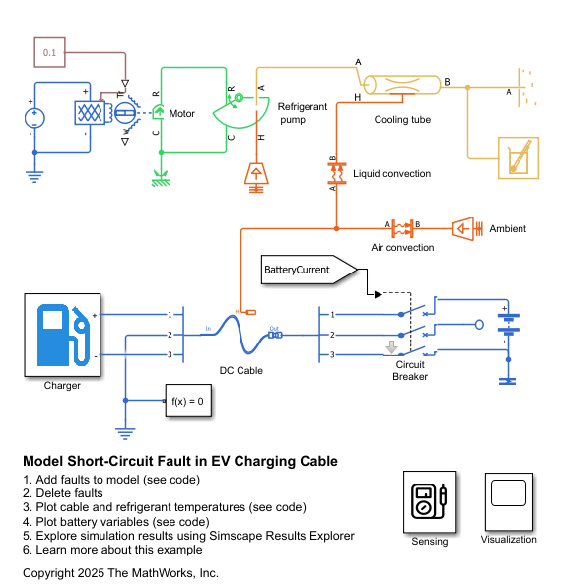
In this example, you model an EV charger cable with three independent conductors that model the DC transmission and its refrigeration system.
You model the DC charging cable using a Cable and Connectors block. Two conductors model the positive and negative phase, which are at +200 V and -200 V, while the third one models the ground connector at 0 V.
You model the EV battery using a Battery block with nominal voltage of 400 V and a cell capacity if 250 Ah. The initial charge of the battery is 125 Ah.
You model the refrigeration system with a Motor & Drive (System Level) block, a Rotational Mechanical Converter (TL) block, and a Pipe (TL) block.
Plot Simulation Results of Unfaulted System
Delete all faults in the model.
Simulink.fault.deleteAll(modelName);
Simulate and plot the results with the cable properly refrigerated.
sim(modelName);
Plot the battery charge, voltage, and current.
EVChargingCableFaultPlotBatteryVariables
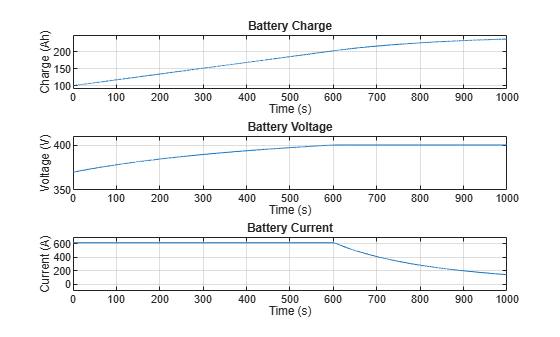
Initially, the battery charges with constant current and variable voltage. The battery current is at its maximum rating of 615 A, the voltage increases as a first-order exponential, and the charge increases linearly. After 600 seconds, the voltage reaches its nominal value of 400 V and the battery charges with constant voltage and variable current. The charging speed and the current decrease.
Plot the cable and refrigerant temperatures.
EVChargingCableFaultPlotTemperatures
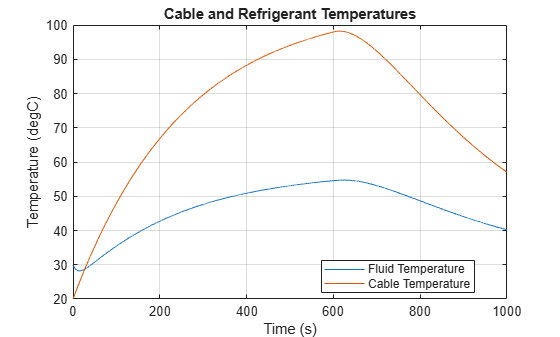
During CC charging, when charge speed is at maximum, the cable temperature increases. During CV charging, when the current decreases, the refrigeration system lowers the cable temperature. If the charging time at maximum current is too long or the refrigeration system does not use enough fluid, the cable temperature rises to failure values.
Plot Simulation Results of Faulted System
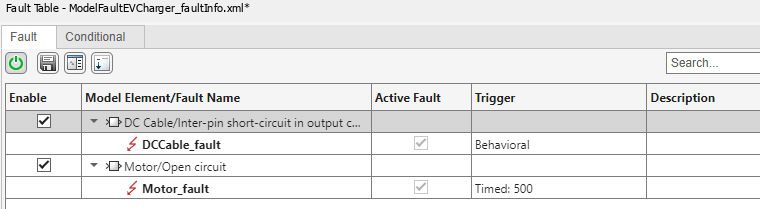
To simulate a fault scenario, add two faults, one to the motor running the refrigeration system and one to the DC cable. The motor fault simulates an open circuit at a specific time which stops the flow of the refrigerant fluid, increasing the temperature of the cable. The DC cable fault simulates a short circuit when the cable temperature rises above a threshold value.
EVChargingCableFaultAddFaults
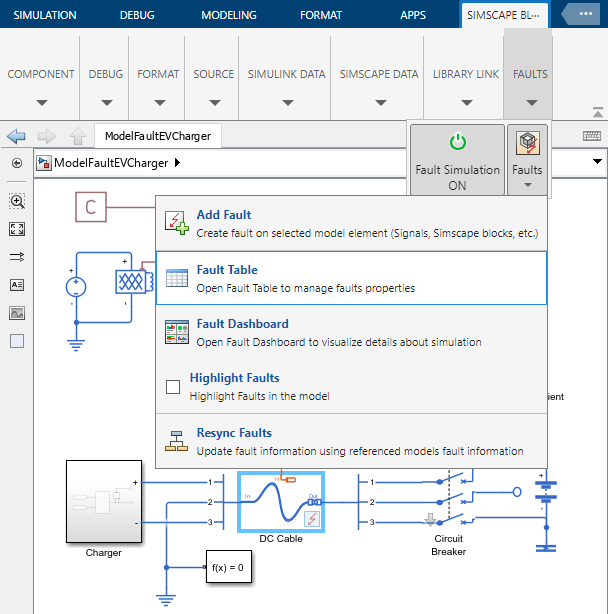
Verify that the faults have been added by opening the Fault Table. In the Simscape Block tab, open the Faults menu and click Fault Table. Verify that the motor fault and the DC cable fault appear in the Fault Table.
Simulate and plot the results.
sim(modelName);
Plot the cable and refrigerant temperatures.
EVChargingCableFaultPlotTemperatures
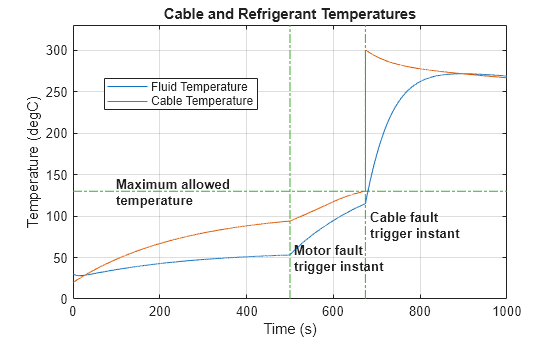
At 500 seconds, the motor fault triggers, resulting in the loss of the refrigerant fluid that cools down the cable. The fluid and cable temperatures start to rise and converge. When the temperature reaches the limit of the cable, a short circuit occurs in the connector. The circuit breaker protects the battery by opening the circuit.
Plot the battery charge, voltage, and current to see the effects of the fault.
EVChargingCableFaultPlotBatteryVariables
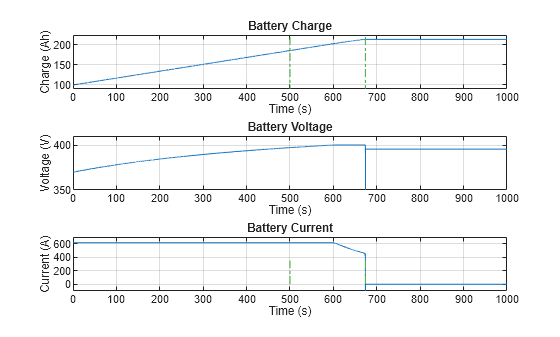
The result plots show that the motor fault does not affect the battery, but the cable connector short circuit causes the battery to discharge. The circuit breaker then protects the battery by opening the circuit, cutting the current. Once the battery disconnects, it is in open mode, and the charge and voltage stay constant.
Regulate Current for Passive Heat Dissipation
To prevent a short-circuit fault in the cable, you can reduce the current so that passive heat dissipation with the air is enough to cool down the cable.
Set the TemperatureSafetyMargin workspace variable to 50 degC and the InitialBatteryCharge to 70 Ah. The TemperatureSafetyMargin workspace variable sets the value of the Constant Value parameter of a Constant block inside the Charger > Current Calculator subsystem. The InitialBatteryCharge workspace variable sets the value of the Charge variable in Initial Targets section of the Battery block parameters.
The charger decreases the current proportionally if the temperature is within 50 degC of the maximum temperature.
TemperatureSafetyMargin = 50;
InitialBatteryCharge = 70;
Extend the simulation time to allow the battery to fully charge. Run the simulation.
StopTime = 3600; %[s]
sim(modelName);
Plot the cable and refrigerant temperatures, and the battery variables.
EVChargingCableFaultPlotTemperatures
EVChargingCableFaultPlotBatteryVariables
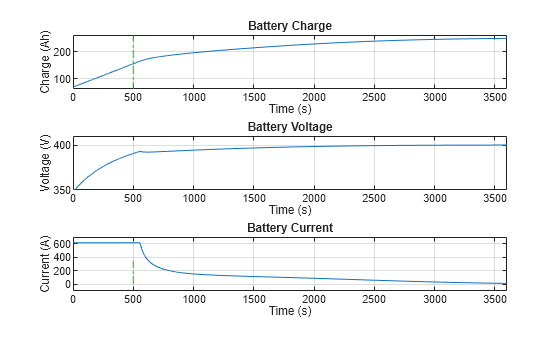
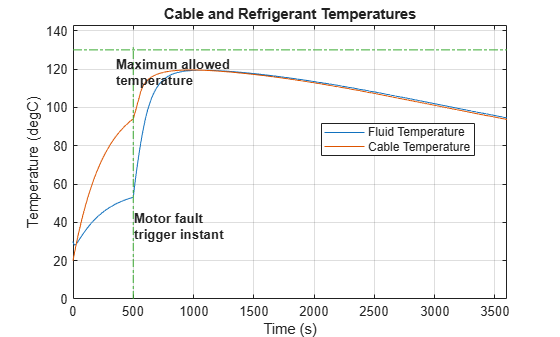
When the motor fault triggers, the fluid and cable temperatures initially increase rapidly. However, the current now decreases even though the voltage has not reached its nominal value. This drop in current prevents further heating, so the cable does not reach the maximum allowed temperature and no short circuit occurs in the connector. The battery now charges more slowly, relying on passive heat dissipation through air rather than active cooling from the refrigeration system.
See Also
Simscape Blocks
- Cable and Connectors | Battery | Motor & Drive (System Level) | Rotational Mechanical Converter (TL) | Pipe (TL)

