Contenu principal

impedance

R2026b

Calculate and plot input impedance of antenna or scan impedance of array

    Description

    impedance(antenna,frequency) calculates the input impedance of the specified antenna and plots the resistance and reactance for the specified frequency.

    example

    z = impedance(antenna,frequency) returns the impedance z of the antenna for the specified frequency.

    example

    impedance(array,frequency,elementnumber) calculates and plots the scan impedance of the specified antenna element in an array.

    z = impedance(array,frequency,elementnumber) returns the scan impedance z of the specified antenna element in an array.

    [___,sweepobj] = impedance(___,SweepOption=Value) uses the specified frequency sweep interpolation method to calculate the antenna impedance or array element scan impedance, and additionally returns the interpolation method type and rational fit parameters stored in a frequency sweep object sweepobj.

    [___] = impedance(___,Name=Value) specifies additional options using one or more name-value arguments. For example, impedance(dipole,60e6:1e6:80e6,UseParallel=true) uses parallel pool to perform impedance calculation at each frequency for a dipole antenna.

    Examples

    collapse all

    Calculate and plot the impedance of a planar dipole antenna over a frequency range of 50 MHz - 100 MHz.

    h = dipole;
    impedance(h,50e6:1e6:100e6);
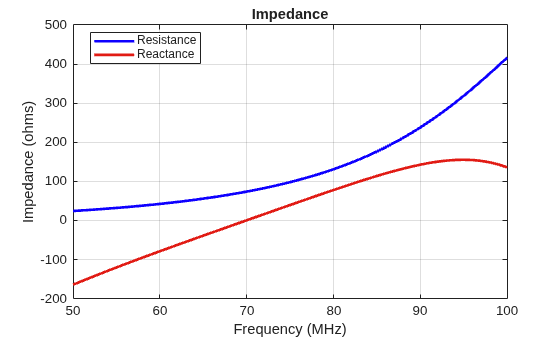
    Figure contains an axes object. The axes object with title Impedance, xlabel Frequency (MHz), ylabel Impedance (ohms) contains 2 objects of type line. These objects represent Resistance, Reactance.

    Calculate scan impedance of default linear array over a frequency range of 50MHz to 100MHz.

    h = linearArray;
    z = impedance(h,50e6:1e6:100e6)
    z = 51×2 complex
    102 ×
    
       0.2993 - 1.7755i   0.2993 - 1.7755i
       0.3106 - 1.6918i   0.3106 - 1.6918i
       0.3222 - 1.6099i   0.3222 - 1.6099i
       0.3340 - 1.5297i   0.3340 - 1.5297i
       0.3460 - 1.4509i   0.3460 - 1.4509i
       0.3582 - 1.3735i   0.3582 - 1.3735i
       0.3708 - 1.2973i   0.3708 - 1.2973i
       0.3836 - 1.2222i   0.3836 - 1.2222i
       0.3967 - 1.1481i   0.3967 - 1.1481i
       0.4101 - 1.0747i   0.4101 - 1.0747i
       0.4239 - 1.0020i   0.4239 - 1.0020i
       0.4381 - 0.9299i   0.4381 - 0.9299i
       0.4527 - 0.8582i   0.4527 - 0.8582i
       0.4677 - 0.7868i   0.4677 - 0.7868i
       0.4833 - 0.7156i   0.4833 - 0.7156i
          ⋮


    Input Arguments

    collapse all

    Antenna for impedance analysis, specified as one of the following options:

    Example: horn

    Array for impedance analysis, specified as one of the following option:

    Example: conformalArray

    Frequency to calculate the impedance, specified as a scalar for a single frequency or a vector for a frequency range in Hertz.

    Example: 50e6:1e6:100e6

    Data Types: double

    Antenna element number in array, specified as a positive integer scalar.

    Example: 1

    Data Types: double

    Name-Value Arguments

    collapse all

    Specify optional pairs of arguments as Name1=Value1,...,NameN=ValueN, where Name is the argument name and Value is the corresponding value. Name-value arguments must appear after other arguments, but the order of the pairs does not matter.

    Example: Sweepoption="interp"

    Option to enable parallel pool, specified as a logical value. The default value is false. Set this option to true or 1 to enable the parallel pool. Use parallel pool to speed up the impedance calculations at multiple frequencies for computationally large antennas and arrays. To use this feature, you need a license to the Parallel Computing Toolbox™.

    Example: UseParallel=true

    Data Types: logical

    Sweep interpolation method, specified as one of the following:

    • "direct" — Compute impedance using all the specified frequencies.

    • "interp" — Interpolate the sweep using rational fitting to compute impedance with minimum possible set of frequency points within the specified frequency range.

    • "interpWithGrad" — Interpolate the sweep using rational fitting with gradient calculations to compute impedance with minimum possible set of frequency points within the specified frequency range.

    • frequencySweep object — Interpolate the sweep using parameters such as error tolerance, number of frequency points, and number of iterations that you set in the frequencySweep object.

    Frequency sweep interpolation methods use rational fitting to interpolate results over the frequency range defined by two or more specified frequency points.

    When you use an interpolating sweep, the frequencies at which the impedance function computes and plots the results can differ from the frequencies in the input frequency vector. The effective set of frequencies depends on SweepOption:

    • If SweepOption is a frequencySweep object, the effective frequencies are determined by its NumFreqs property.

    • If SweepOption is "interp" or "interpWithGrad", the number of frequency points depends on how many frequencies you provide:

      • If you provide more than 30 frequencies, the sweep uses your frequencies directly.

      • If you provide 30 or fewer frequencies, the sweep uses the default of 100 points across the band.

    Sweep Interpolation Methods

    MethodWhen to UseTrade-off
    "direct"Results at all specified frequenciesHigh computational cost; slow for large sweeps
    "interp"Faster results with automatic accuracy control and fewer simulationsNo control over number of frequency points
    "interpWithGrad"Faster results with gradient information for optimizationSlightly more expensive than "interp"
    frequencySweep objectManual control over frequency resolution, error tolerance, and number of iterationsRequires manual tuning; no adaptive refinement

    To use this feature, you need an RF Toolbox™ license.

    Example: [z,sweepobj] = impedance(dipole,[10e6:1e6:180e6],SweepOption="interp")

    Data Types: string

    Output Arguments

    collapse all

    Input impedance of antenna or scan impedance of array, returned as one of the following:

    • a scalar complex number in ohms for an antenna with single analysis frequency

    • a NumFreq-by-1 vector of complex numbers for an antenna with a range of analysis frequencies

    • a 2-by-NumElem vector of complex numbers for an array with 2 analysis frequencies

    • a NumFreq-by-NumElem matrix of complex numbers for arrays with a range of analysis frequencies

    NumFreq is the number of specified frequencies and NumElem is the number of array elements. The real part of the complex number indicates the resistance. The imaginary part of the complex number indicates the reactance.

    Note

    Antenna Toolbox™ caches the impedance values while running for the first time so that the subsequent runs are faster.

    Frequency sweep interpolation parameters, returned as a frequencySweep object.

    Tips

    • Interpolating frequency sweeps may report results at frequencies that differ from the frequencies you specify. If you require results at exact frequencies, either use the default direct sweep, or set the NumFreqs property of the frequencySweep object greater than or equal to the number of frequencies you provide.

    • When using the "interp" or "interpWithGrad" sweep options, provide more than 30 frequency points to have the sweep use your frequency resolution exactly; otherwise the sweep defaults to 100 points across the band.

    Version History

    Introduced in R2015a

    expand all