phitheta2uv
R2026bConvert phi/theta angles to u/v coordinates
Description
converts
the phi/theta
angle pairs to their corresponding u/v space coordinates.UV = phitheta2uv(PhiTheta)
Examples
Find the corresponding u-v representation for = 30° and = 0°.
uv = phitheta2uv([30; 0])
uv = 2×1
0
0
Input Arguments
Phi and theta angles, specified as a two-row matrix. Each column of the matrix represents an angle in degrees, in the form [phi; theta].
Data Types: double
Output Arguments
Angle in u/v space, returned
as a two-row matrix. Each column of the matrix represents an angle
in the form [u; v]. The matrix
dimensions of UV are the same as those of PhiTheta.
More About
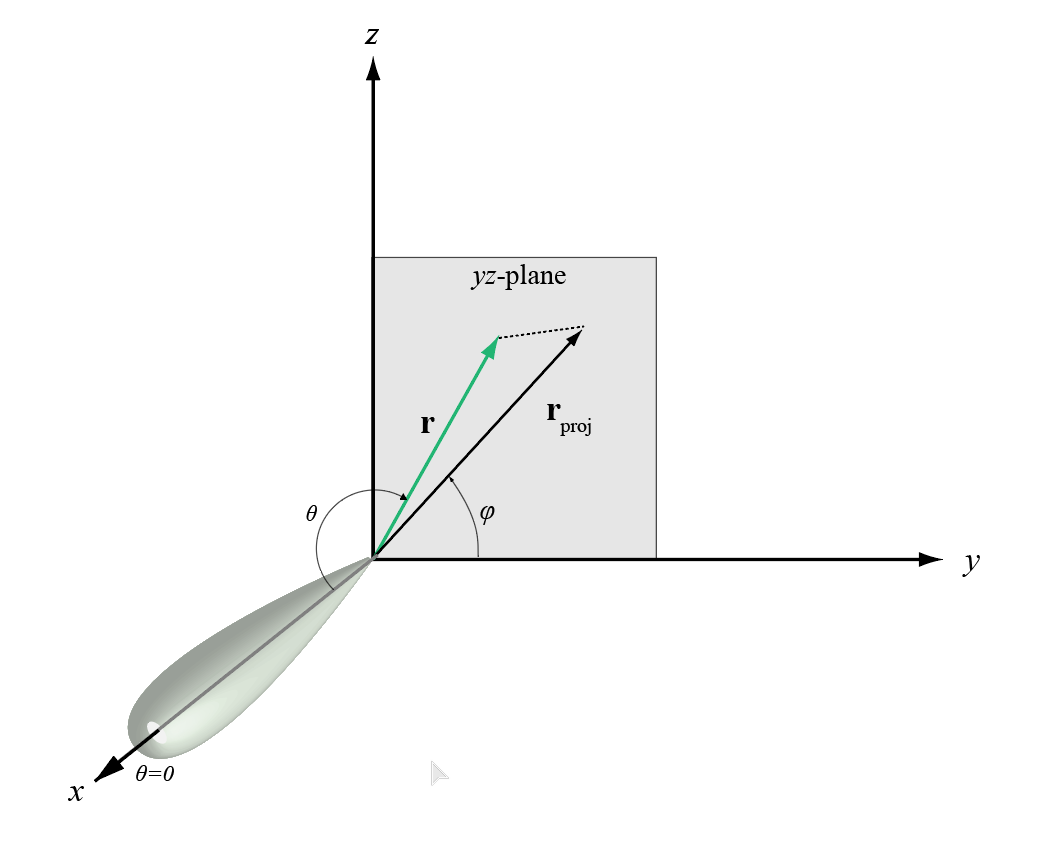
The phi angle (φ) is the angle from the positive y-axis to the vector’s orthogonal projection onto the yz plane. The angle is positive toward the positive z-axis. The phi angle is between 0 and 360 degrees. The theta angle (θ) is the angle from the x-axis to the vector itself. The angle is positive toward the yz plane. The theta angle is between 0 and 180 degrees.
The figure illustrates phi and theta for a vector that appears as a green solid line.
The coordinate transformations between φ/θ and az/el are described by the following equations
The u/v coordinates for the hemisphere x ≥ 0 are derived from the phi and theta angles.
The relations are
In these expressions, φ and θ are the phi and theta angles, respectively.
To convert azimuth and elevation to u and v use the transformation
which is valid only in the range abs(az)≤90.
The values of u and v satisfy the inequalities
Conversely, the phi and theta angles can be written in terms of u and v using
The azimuth and elevation angles can also be written in terms of u and v:
Extended Capabilities
Usage notes and limitations:
Does not support variable-size inputs.
Refer to the usage notes and limitations in the C/C++ Code Generation section. The same usage notes and limitations apply to GPU code generation.
Version History
Introduced in R2012a
MATLAB Command
You clicked a link that corresponds to this MATLAB command:
Run the command by entering it in the MATLAB Command Window. Web browsers do not support MATLAB commands.
Sélectionner un site web
Choisissez un site web pour accéder au contenu traduit dans votre langue (lorsqu'il est disponible) et voir les événements et les offres locales. D’après votre position, nous vous recommandons de sélectionner la région suivante : .
Vous pouvez également sélectionner un site web dans la liste suivante :
Comment optimiser les performances du site
Pour optimiser les performances du site, sélectionnez la région Chine (en chinois ou en anglais). Les sites de MathWorks pour les autres pays ne sont pas optimisés pour les visites provenant de votre région.
Amériques
- América Latina (Español)
- Canada (English)
- United States (English)
Europe
- Belgium (English)
- Denmark (English)
- Deutschland (Deutsch)
- España (Español)
- Finland (English)
- France (Français)
- Ireland (English)
- Italia (Italiano)
- Luxembourg (English)
- Netherlands (English)
- Norway (English)
- Österreich (Deutsch)
- Portugal (English)
- Sweden (English)
- Switzerland
- United Kingdom (English)