Detect Change
Detect change in signal value
Libraries:
Simulink /
Logic and Bit Operations
HDL Coder /
Logic and Bit Operations
Description
The Detect Change block determines if an input signal does not equal its previous value. The initial condition determines the initial value of the previous input U/z.
This block supports only fixed-step discrete sample times.
Examples
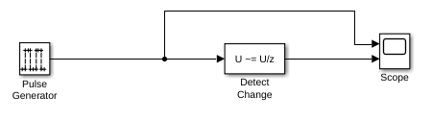
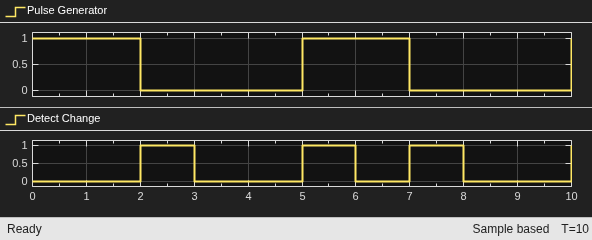
This example shows how to detect a change in signal values using the Detect Change block. When the input from the Pulse Generator block remains the same, the Detect Change block outputs zero (false), indicating that there was no change in signal values. When the value of the Pulse Generator block changes, the Detect Change block outputs one (true) indicating that the current signal value does not equal its previous value.
Ports
Input
Input signal, specified as a scalar, vector, or matrix.
Data Types: single | double | int8 | int16 | int32 | int64 | uint8 | uint16 | uint32 | uint64 | Boolean | fixed point | enumerated | built-in integer | floating point
Output
Output signal, true (equal to 1) when the input signal does not equal its previous value; false (equal to 0) when the input signal equals its previous value.
Data Types: uint8 | Boolean
Parameters
Set the initial condition for the previous input U/z.
Programmatic Use
Block Parameter:
vinit |
| Type: character vector |
| Values: scalar | vector |
Default:'0' |
Specify whether the block performs sample- or frame-based processing:
Columns as channels (frame based)— Treat each column of the input as a separate channel (frame-based processing).Note
Frame-based processing requires a DSP System Toolbox™ license.
For more information, see Sample- and Frame-Based Concepts (DSP System Toolbox).
Elements as channels (sample based)— Treat each element of the input as a separate channel (sample-based processing).
Use Input processing to specify whether the block performs sample- or frame-based processing. For more information about these two processing modes, see Sample- and Frame-Based Concepts (DSP System Toolbox).
Programmatic Use
Block Parameter:
InputProcessing |
| Type: character vector |
Values: 'Columns as channels
(frame based)' | 'Elements as channels (sample
based)' |
Default: 'Elements as channels
(sample based)' |
Set the output data type to boolean or
uint8.
Programmatic Use
Block Parameter:
OutDataTypeStr |
| Type: character vector |
Values:
'boolean' |
'uint8' |
Default:
'boolean' |
Block Characteristics
Data Types |
|
Direct Feedthrough |
|
Multidimensional Signals |
|
Variable-Size Signals |
|
Zero-Crossing Detection |
|
Extended Capabilities
Generated code relies on memcpy or memset
functions (string.h) under certain conditions.
HDL Coder™ provides additional configuration options that affect HDL implementation and synthesized logic.
This block has one default HDL architecture.
| ConstrainedOutputPipeline | Number of registers to place at
the outputs by moving existing delays within your design. Distributed
pipelining does not redistribute these registers. The default is
|
| InputPipeline | Number of input pipeline stages
to insert in the generated code. Distributed pipelining and constrained
output pipelining can move these registers. The default is
|
| OutputPipeline | Number of output pipeline stages
to insert in the generated code. Distributed pipelining and constrained
output pipelining can move these registers. The default is
|
| SynthesisAttributes |
Specifies the synthesis attributes for the blocks and block output signals in the model. The generated HDL code contains these attributes. For more information, see SynthesisAttributes (HDL Coder). |
PLC Code Generation
Generate Structured Text code using Simulink® PLC Coder™.
Fixed-Point Conversion
Design and simulate fixed-point systems using Fixed-Point Designer™.
Version History
Introduced before R2006aUse the SynthesisAttributes HDL block property to specify the synthesis attributes for the block and its output signals. HDL Coder includes these attributes in the generated HDL code.
MATLAB Command
You clicked a link that corresponds to this MATLAB command:
Run the command by entering it in the MATLAB Command Window. Web browsers do not support MATLAB commands.
Sélectionner un site web
Choisissez un site web pour accéder au contenu traduit dans votre langue (lorsqu'il est disponible) et voir les événements et les offres locales. D’après votre position, nous vous recommandons de sélectionner la région suivante : .
Vous pouvez également sélectionner un site web dans la liste suivante :
Comment optimiser les performances du site
Pour optimiser les performances du site, sélectionnez la région Chine (en chinois ou en anglais). Les sites de MathWorks pour les autres pays ne sont pas optimisés pour les visites provenant de votre région.
Amériques
- América Latina (Español)
- Canada (English)
- United States (English)
Europe
- Belgium (English)
- Denmark (English)
- Deutschland (Deutsch)
- España (Español)
- Finland (English)
- France (Français)
- Ireland (English)
- Italia (Italiano)
- Luxembourg (English)
- Netherlands (English)
- Norway (English)
- Österreich (Deutsch)
- Portugal (English)
- Sweden (English)
- Switzerland
- United Kingdom (English)