Suppose you log a signal generated from a Random
Number block to the Simulation Data Inspector. You can get descriptive statics
about the logged signal using the Simulink.sdi.Signal object.
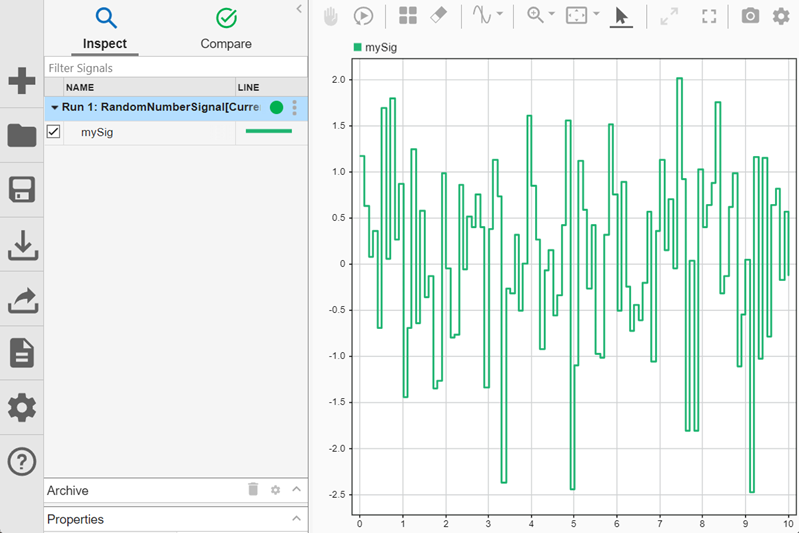
Access the Simulink.sdi.Signal object for the signal named
mySig.
Find the minimum sample value using the min function.
minVal = min(sigObj)
minVal =
-2.4828
To find the minimum sample value near the end of the simulation, specify the
starting time. For example, to find the minimum value in the last two seconds of the
simulation, specify startTime as 8.
minValEnd = min(sigObj,8)
minValEnd =
-2.4828
To find the minimum sample value in a specific interval, specify the start and end
time to search in. For example, find the minimum sample value between 2 seconds and 4
seconds.
Input signal, specified as a numerical scalar Simulink.sdi.Signal
object.
To find the minimum value of a composite signal element, such as a bus element, or
the minimum value of the real or imaginary part of a complex signal, use the
Children property. The Children property
contains Simulink.sdi.Signal objects that make up the composite signal
or real and imaginary parts of the complex signal.
For composite signals, access elements in the Children
property by index.
For complex signals, the first element in the Children
property is the real part of the complex signal and the second element is the
imaginary part.
Example: minVal = min(complexSig.Children(1))
Start time, specified as a nonnegative scalar less than endTime.
This time specifies the beginning of the time interval in which to find a minimum
value.
End time, specified as a nonnegative scalar greater than
startTime and less than the simulation time. This time specifies
the end of the time interval in which to find a minimum value.
You clicked a link that corresponds to this MATLAB command:
Run the command by entering it in the MATLAB Command Window.
Web browsers do not support MATLAB commands.
Sélectionner un site web
Choisissez un site web pour accéder au contenu traduit dans votre langue (lorsqu'il est disponible) et voir les événements et les offres locales. D’après votre position, nous vous recommandons de sélectionner la région suivante : .
Vous pouvez également sélectionner un site web dans la liste suivante :
Comment optimiser les performances du site
Pour optimiser les performances du site, sélectionnez la région Chine (en chinois ou en anglais). Les sites de MathWorks pour les autres pays ne sont pas optimisés pour les visites provenant de votre région.