padv.builtin.query.FindMAJustificationFileForModel Class
Namespace: padv.builtin.query
Superclasses: padv.Query
Query for finding Model Advisor justifications file for model
Description
The padv.builtin.query.FindMAJustificationFileForModel class provides a
query that can return the Model Advisor justifications file associated with a model. You can
automatically include or exclude certain artifacts by using the optional name-value
arguments.
You can use this query in your process model to find artifacts for your tasks to iterate over or use as inputs.
The padv.builtin.query.FindMAJustificationFileForModel class is a handle class.
Creation
Description
creates a query for finding the Model Advisor justifications file for a model. The query
expects that the current iteration artifact is a model, and by default, the Model Advisor
justifications file name is
query = padv.builtin.query.FindMAJustificationFileForModel(JustificationFolder = relativePathToFolder). The query
returns the justifications file as a modelname_justifications.jsonpadv.Artifact object of type
ma_justification_file.
sets certain properties using one or more name-value arguments. For example,
query = padv.builtin.query.FindMAJustificationFileForModel(___,Name=Value)padv.builtin.query.FindMAJustificationFileForModel(Name =
"FindMyJustification") creates a query object with the name
"FindMyJustification".
The padv.builtin.query.FindMAJustificationFileForModel class also has other properties, but you cannot set
those properties during query creation.
Input Arguments
Relative path to folder that contains Model Advisor justifications files
(.json) for the models in the project, specified as a string or a
character vector.
Example: fullfile("Justifications","ModelAdvisor")
Data Types: char | string
Name-Value Arguments
Specify optional pairs of arguments as
Name1=Value1,...,NameN=ValueN, where Name is
the argument name and Value is the corresponding value.
Name-value arguments must appear after other arguments, but the order of the
pairs does not matter.
Example: query = padv.builtin.query.FindMAJustificationFileForModel(Name =
"FindMyJustifications")
Unique identifier for query, specified as a string.
Example: "FindMyJustification"
Data Types: string
Initial query run before iteration query, specified as either a
padv.Query object or the Name of a
padv.Query object. When you specify a padv.Query
object as the iteration query for a task, the Parent query is
the initial query that the build system runs before running the specified iteration
query.
The build system ignores the Parent query when you specify
a query as an input query or dependency query for a task.
For information on how to improve Process Advisor load times by sharing query instances across your process model, see Best Practices for Process Model Authoring.
Example: padv.builtin.query.FindModels
Example: padv.builtin.query.FindModels(IncludePath =
"Control")
Properties
Relative path to folder that contains Model Advisor justifications files
(.json) for the models in the project, specified as a string or a
character vector.
When the query searches for a justifications file, the query combines the
justification folder path with the justifications filename specified by property
JustificationFilename.
Note that if you specify the UseModelProperty property as
true, the query ignores the JustificationFoler
property and searches for the justifications file in the same location as the iteration
model file.
Example: fullfile("Justifications","ModelAdvisor")
Data Types: char | string
Name pattern of the justifications file, specified as a string.
The query replaces $ModelName$ with the iteration model
name.
Example: "$ModelName$JustificationFile.json"
Data Types: string
Search for the justifications file in the same folder as the model file, specified as a numeric or logical:
0(false) — The query uses the path specified by theJustificationFolderproperty.1(true) — The query ignores theJustificationFolderproperty and instead searches for the justifications file in the same folder as the iteration model file.
Example: true
Data Types: logical
Query title, specified as a string or a character vector.
Example: "Find my Model Advisor justification file"
Data Types: string
Default artifact type returned by the query, specified as one or more of the values in this table. To specify multiple values, use an array.
| Category | Artifact Type | Description |
|---|---|---|
MATLAB® | "m_class" | MATLAB class |
"m_file" | MATLAB file | |
"m_func" | MATLAB function | |
"m_method" | MATLAB class method | |
"m_property" | MATLAB class property | |
Model Advisor | "ma_config_file" | Model Advisor configuration file |
"ma_justification_file" | Model Advisor justifications file | |
Model Finder | "mf_database" | Model Finder database file |
Process Advisor | "padv_dep_artifacts" | Related artifacts that current artifact depends on |
"padv_output_file" | Process Advisor output file | |
Project | "project" | Current project file |
Requirements | "mwreq_file" | Requirement file (since R2024b) |
"mwreq_item" | Requirement (since R2024b) | |
| Requirement (for R2024a and earlier) | |
"sl_req_file" | Requirement file (for R2024a and earlier) | |
"sl_req_table" | Requirements Table | |
Stateflow® | "sf_chart" | Stateflow chart |
"sf_graphical_fcn" | Stateflow graphical function | |
"sf_group" | Stateflow group | |
"sf_state" | Stateflow state | |
"sf_state_transition_chart" | Stateflow state transition chart | |
"sf_truth_table" | Stateflow truth table | |
Simulink® | "sl_block_diagram" | Block diagram |
"sl_data_dictionary_file" | Data dictionary file | |
"sl_embedded_matlab_fcn" | MATLAB function | |
"sl_block_diagram" | Block diagram | |
"sl_library_file" | Library file | |
"sl_model_file" | Simulink model file | |
"sl_protected_model_file" | Protected Simulink model file | |
"sl_subsystem" | Subsystem | |
"sl_subsystem_file" | Subsystem file | |
System Composer™ | "zc_block_diagram" | System Composer architecture |
"zc_component" | System Composer architecture component | |
"zc_file" | System Composer architecture file | |
| Tests | "harness_info_file" | Harness info file |
"sl_harness_block_diagram" | Harness block diagram | |
"sl_harness_file" | Test harness file | |
"sl_test_case" | Simulink Test™ case | |
"sl_test_case_result" | Simulink Test case result | |
"sl_test_file" | Simulink Test file | |
"sl_test_iteration" | Simulink Test iteration | |
"sl_test_iteration_result" | Simulink Test iteration result | |
"sl_test_report_file" | Simulink Test result report | |
"sl_test_result_file" | Simulink Test result file | |
"sl_test_resultset" | Simulink Test result set | |
"sl_test_seq" | Test Sequence | |
"sl_test_suite" | Simulink Test suite | |
"sl_test_suite_result" | Simulink Test suite result |
Initial query run before iteration query, specified as either a
padv.Query object or the Name of a
padv.Query object. When you specify a padv.Query
object as the iteration query for a task, the Parent query is the
initial query that the build system runs before running the specified iteration
query.
The build system ignores the Parent query when you specify a
query as an input query or dependency query for a task.
For information on how to improve Process Advisor load times by sharing query instances across your process model, see Best Practices for Process Model Authoring.
Example: padv.builtin.query.FindModels
Example: padv.builtin.query.FindModels(IncludePath =
"Control")
Unique identifier for query, specified as a string.
Example: "FindMyJustification"
Data Types: string
Show file extensions in the Alias property of returned
artifacts, specified as a numeric or logical 1
(true) or 0 (false). The
Alias property controls the display name for the artifact in the
Tasks column in Process Advisor.
By default, queries strip file extensions from the Alias
property of each task iteration artifact. To show file extensions for
all artifacts in the
Tasks column, select the project setting Show file
extensions. To keep file extensions in the results for a specific query,
specify the query property ShowFileExtension as
true.
Example: true
Data Types: logical
Setting for automatically sorting artifacts by address, specified as a numeric or
logical 1 (true) or 0
(false). When a query returns artifacts, the artifacts should be in
a consistent order. By default, the build system sorts artifacts by the artifact
address.
Alternatively, you can sort artifacts in a different order by overriding the
internal sortArtifacts method in a subclass that defines a custom sort
behavior. For an example, see Sort Artifacts in Specific Order.
The build system automatically calls the sortArtifacts method when
using the process model. The sortArtifacts method expects two input
arguments: a padv.Query object and a list of
padv.Artifact objects returned by the run method.
The sortArtifacts method should return a list of sorted
padv.Artifact objects.
Example: SortArtifacts = false
Data Types: logical
Handle to the function that a function-based query
runs, specified as
a function_handle.
If you define your query functionality inside a function and you or the build system
call run on the query, the query runs the function specified by the
function_handle.
The built-in queries are defined inside classes and do not use the
FunctionHandle.
Example: FunctionHandle = @FunctionForQuery
Data Types: function_handle
Methods
This class overrides the following inherited methods.
run | Run query to find the artifacts that meet the criteria specified by the query. The query returns a Note You do not need to manually invoke this method inside your process model.
The build system automatically invokes the
The function artifacts = run(obj,iterationArtifact) ... end
For more information on artifact types, see Valid Artifact Types. |
Examples
You can use the FindMAJustificationFileForModel query
in your process model to find Model Advisor justifications files for your tasks to iterate
over (IterationQuery) or use as inputs
(addInputQueries). For example, you can use the
FindMAJustificationFileForModel query to find the Model Advisor
justifications files associated with each model and provide those files as the input to
the built-in task padv.builtin.task.RunModelStandards.
Open a project. For this example, you can open the Process Advisor example project.
processAdvisorExampleStart
If you want the built-in task padv.builtin.task.RunModelStandards
to use your Model Advisor justifications files when checking modeling standards, you can
reconfigure the task to add the justifications files as inputs. Add the built-in query
padv.builtin.query.FindMAJustificationFileForModel as an input
query for the task and specify the folder, JustificationFolder, that
contains the justifications files. For example, if your justifications files are in the
directory Justifications/ModelAdvisor relative to your project root,
use the function addInputQueries to add those justifications files
as inputs to the
task:
%% Check modeling standards % Tools required: Model Advisor if includeModelStandardsTask maTask = pm.addTask(padv.builtin.task.RunModelStandards()); % Find and use justifications files maTask.addInputQueries(... padv.builtin.query.FindMAJustificationFileForModel(... JustificationFolder=fullfile("Justifications","ModelAdvisor"))); end
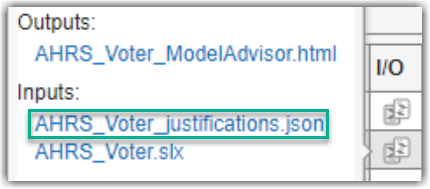
In Process Advisor, view the updated Tasks by clicking Refresh Tasks and switching to the Project view. When you run the Check Modeling Standards task, the justifications file appears as an input in the I/O column in Process Advisor.
Capabilities and Limitations
This table identifies functionality that is supported by the query.
| Functionality | Supported? |
|---|---|
Input query for task | Yes. |
Iteration query for task | Yes. |
MATLAB Command
You clicked a link that corresponds to this MATLAB command:
Run the command by entering it in the MATLAB Command Window. Web browsers do not support MATLAB commands.
Sélectionner un site web
Choisissez un site web pour accéder au contenu traduit dans votre langue (lorsqu'il est disponible) et voir les événements et les offres locales. D’après votre position, nous vous recommandons de sélectionner la région suivante : .
Vous pouvez également sélectionner un site web dans la liste suivante :
Comment optimiser les performances du site
Pour optimiser les performances du site, sélectionnez la région Chine (en chinois ou en anglais). Les sites de MathWorks pour les autres pays ne sont pas optimisés pour les visites provenant de votre région.
Amériques
- América Latina (Español)
- Canada (English)
- United States (English)
Europe
- Belgium (English)
- Denmark (English)
- Deutschland (Deutsch)
- España (Español)
- Finland (English)
- France (Français)
- Ireland (English)
- Italia (Italiano)
- Luxembourg (English)
- Netherlands (English)
- Norway (English)
- Österreich (Deutsch)
- Portugal (English)
- Sweden (English)
- Switzerland
- United Kingdom (English)