nnmf
R2026bNonnegative matrix factorization
Description
[
factors the n-by-m matrix W,H] = nnmf(A,k)A
into nonnegative factors W
(n-by-k) and H
(k-by-m). The factorization is not exact;
W*H is a lower-rank approximation to A.
The factors W and H minimize the root mean
square residual D between A and
W*H.
D = norm(A - W*H,'fro')/sqrt(n*m)The factorization uses an iterative algorithm starting with random initial values
for W and H. Because the root mean square
residual D might have local minima, repeated factorizations might
yield different W and H. Sometimes the
algorithm converges to a solution of lower rank than k, which can
indicate that the result is not optimal.
Examples
Load the sample data.
load fisheririsCompute a nonnegative rank-two approximation of the measurements of the four variables in Fisher's iris data.
rng(1) % For reproducibility
[W,H] = nnmf(meas,2);
HH = 2×4
0.6945 0.2856 0.6220 0.2218
0.8020 0.5683 0.1834 0.0149
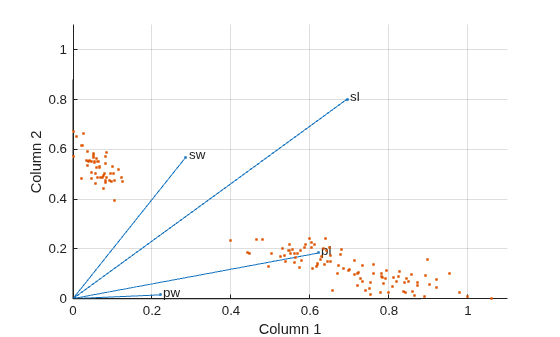
The first and third variables in meas (sepal length and petal length, with coefficients 0.6945 and 0.6220, respectively) provide relatively strong weights to the first column of W. The first and second variables in meas (sepal length and sepal width, with coefficients 0.8020 and 0.5683, respectively) provide relatively strong weights to the second column of W.
Create a biplot of the data and the variables in meas in the column space of W.
biplot(H','Scores',W,'VarLabels',{'sl','sw','pl','pw'}); axis([0 1.1 0 1.1]) xlabel('Column 1') ylabel('Column 2')
Starting from a random array X with rank 20, try a few iterations at several replicates using the multiplicative algorithm.
rng default % For reproducibility X = rand(100,20)*rand(20,50); opt = statset('MaxIter',5,'Display','final'); [W0,H0] = nnmf(X,5,'Replicates',10,... 'Options',opt,... 'Algorithm','mult');
rep iteration rms resid |delta x|
1 5 0.560887 0.0245182
2 5 0.66418 0.0364471
3 5 0.609125 0.0358355
4 5 0.608894 0.0415491
5 5 0.619291 0.0455135
6 5 0.621549 0.0299965
7 5 0.640549 0.0438758
8 5 0.673015 0.0366856
9 5 0.606835 0.0318931
10 5 0.633526 0.0319591
Final root mean square residual = 0.560887
Continue with more iterations from the best of these results using alternating least squares.
opt = statset('Maxiter',1000,'Display','final'); [W,H] = nnmf(X,5,'W0',W0,'H0',H0,... 'Options',opt,... 'Algorithm','als');
rep iteration rms resid |delta x|
1 24 0.257336 0.00271859
Final root mean square residual = 0.257336
Input Arguments
Name-Value Arguments
Specify optional pairs of arguments as
Name1=Value1,...,NameN=ValueN, where Name is
the argument name and Value is the corresponding value.
Name-value arguments must appear after other arguments, but the order of the
pairs does not matter.
Before R2021a, use commas to separate each name and value, and enclose
Name in quotes.
Example: [W,H] = nnmf(A,k,'Algorithm','mult','Replicates',10)
chooses the multiplicative update algorithm and ten replicates to improve the
result
Factorization algorithm, specified as the comma-separated pair
consisting of 'Algorithm' and
'als' (alternating least squares) or
'mult' (a multiplicative update
algorithm).
The 'als' algorithm typically is more stable and
converges in fewer iterations. Each iteration takes longer. Therefore,
the default maximum is 50, which usually gives satisfactory results in
internal testing.
The 'mult' algorithm typically has faster
iterations and requires more of them. The default maximum is 100. This
algorithm tends to be more sensitive to starting values and, therefore,
seems to benefit more from running multiple replications.
Example: 'Algorithm','mult'
Data Types: char | string
Algorithm options, specified as the comma-separated pair consisting
of 'Options' and a structure returned by the
statset function.
nnmf uses the following fields of the options
structure.
| Field | Description | Values |
|---|---|---|
Display | Level of iterative display |
|
MaxIter | Maximum number of iterations | Positive integer. The default is
50 for the
'als' algorithm and
100 for the
'mult' algorithm. Unlike in
optimization settings, reaching
MaxIter iterations is treated as
convergence. |
TolFun | Termination tolerance on the change in size of the residual | Nonnegative value. The default is
1e-4. |
TolX | Termination tolerance on the relative change in the
elements of W and
H | Nonnegative value. The default is
1e-4. |
UseParallel | Option to perform computations in parallel | Set this value to "auto" or
"on" to run computations in parallel.
If you specify "auto", MATLAB® uses a parallel pool if one is available,
otherwise runs in serial. If you specify
"on", MATLAB uses a parallel pool if
one is available, otherwise throws an error. The default
is "off". |
UseSubstreams | Type of reproducibility when computing in parallel |
|
Streams | A RandStream object or cell array of such
objects |
|
Example: 'Options',statset('Display','iter','MaxIter',50)
Data Types: struct
Number of times to repeat the factorization, specified as the
comma-separated pair consisting of 'Replicates' and a
positive integer. The algorithm chooses new random starting values for
W and H at each replication,
except at the first replication if you specify 'W0'
and 'H0'. If you specify a value greater than
1, you can obtain better results by setting
Algorithm to 'mult'. See
Change Algorithm.
Example: 10
Data Types: single | double
Output Arguments
Root mean square residual, returned as a nonnegative scalar.
D = norm(A - W*H,'fro')/sqrt(n*m)References
[1] Berry, Michael W., Murray Browne, Amy N. Langville, V. Paul Pauca, and Robert J. Plemmons. “Algorithms and Applications for Approximate Nonnegative Matrix Factorization.” Computational Statistics & Data Analysis 52, no. 1 (September 2007): 155–73. https://doi.org/10.1016/j.csda.2006.11.006.
Extended Capabilities
The nnmf function has automatic parallel support. To run
computations in parallel, specify the Options name-value argument and set
the UseParallel field of the options structure to
"on" or "auto" using
statset:
Options=statset(UseParallel="auto")
For more information, see Run MATLAB Functions with Automatic Parallel Support (Parallel Computing Toolbox).
Version History
Introduced in R2008aThe UseParallel field of the Options name-value
argument now accepts "off", "auto", or
"on" values instead of true or
false. This change gives you more control over when to use a parallel
pool for parallel execution. Specifying the UseParallel field as
true or false is not recommended.
This table shows how to update your code depending on your goal.
| Goal | Not Recommended | Recommended |
|---|---|---|
Write code that runs on the MATLAB client. |
Options=statset(UseParallel=false)
|
Options=statset(UseParallel="off")
|
| Write portable code that runs on a parallel pool and, if a pool is not available, runs on the MATLAB client. |
Options=statset(UseParallel=true)
|
Options=statset(UseParallel="auto")
|
| Write code that runs on a parallel pool and errors if a pool is not available. | N/A |
Options=statset(UseParallel="on")
|
There are no plans to remove support for the true or
false values.
MATLAB Command
You clicked a link that corresponds to this MATLAB command:
Run the command by entering it in the MATLAB Command Window. Web browsers do not support MATLAB commands.
Sélectionner un site web
Choisissez un site web pour accéder au contenu traduit dans votre langue (lorsqu'il est disponible) et voir les événements et les offres locales. D’après votre position, nous vous recommandons de sélectionner la région suivante : .
Vous pouvez également sélectionner un site web dans la liste suivante :
Comment optimiser les performances du site
Pour optimiser les performances du site, sélectionnez la région Chine (en chinois ou en anglais). Les sites de MathWorks pour les autres pays ne sont pas optimisés pour les visites provenant de votre région.
Amériques
- América Latina (Español)
- Canada (English)
- United States (English)
Europe
- Belgium (English)
- Denmark (English)
- Deutschland (Deutsch)
- España (Español)
- Finland (English)
- France (Français)
- Ireland (English)
- Italia (Italiano)
- Luxembourg (English)
- Netherlands (English)
- Norway (English)
- Österreich (Deutsch)
- Portugal (English)
- Sweden (English)
- Switzerland
- United Kingdom (English)