keyPointsToStruct
R2026bConvert OpenCV KeyPoints object to MATLAB structure
Description
Examples
This example shows how to use the prebuilt MATLAB interface for the OpenCV function cv::Fast in MATLAB to detect keypoints in an image. Additionally, use the keyPointsToStruct utility function to write the keypoints returned by the OpenCV cv::Fast function to a MATLAB structure.
Add the MATLAB interface to OpenCV package names to the import list.
import clib.opencv.*;
import vision.opencv.util.*;
Read an image into the MATLAB workspace.
img = imread("elephant.jpg");Create MATLAB interface objects for the OpenCV MatND and InputArray classes to store the input image.
[inputMat,inputArray] = createMat(img);
Create a MATLAB interface object for the OpenCV KeyPoint vector by using the clibArray function.
keyPointsVec = clibArray("clib.opencv.cv.KeyPoint",0);Specify the parameters for computing keypoints using the FAST detector.
threshold = 100;
nonmaxSuppression = true;
Compute keypoints in the image by calling the OpenCV function cv::FAST in MATLAB.
cv.FAST(inputArray,keyPointsVec,threshold,nonmaxSuppression);
Convert the KeyPoints object returned by the OpenCV function into a MATLAB structure.
mlstruct = keyPointsToStruct(keyPointsVec);
Inspect the fields in the output MATLAB structure.
mlstruct
mlstruct = struct with fields:
       Location: [48×2 double]
          Scale: [48×1 double]
         Metric: [48×1 double]
           Misc: [48×1 double]
    Orientation: [48×1 double]
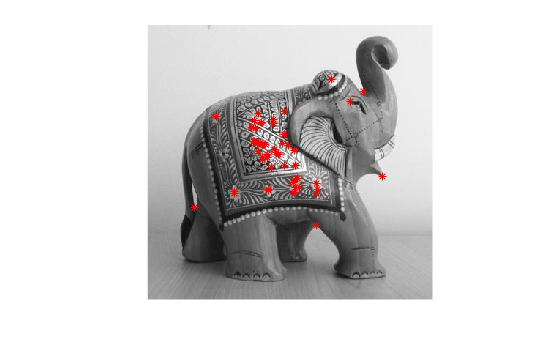
Display the input image and plot the detected keypoints.
figure
imshow(img)
hold on
plot(mlstruct.Location(:,1),mlstruct.Location(:,2),"*r")
hold off
Input Arguments
Output Arguments
Version History
Introduced in R2021b
See Also
rectToBbox | getImage | getBasePtr | createUMat | createMat | clibArray

