How to determine the minimum point of a plot?
Afficher commentaires plus anciens
Hi,
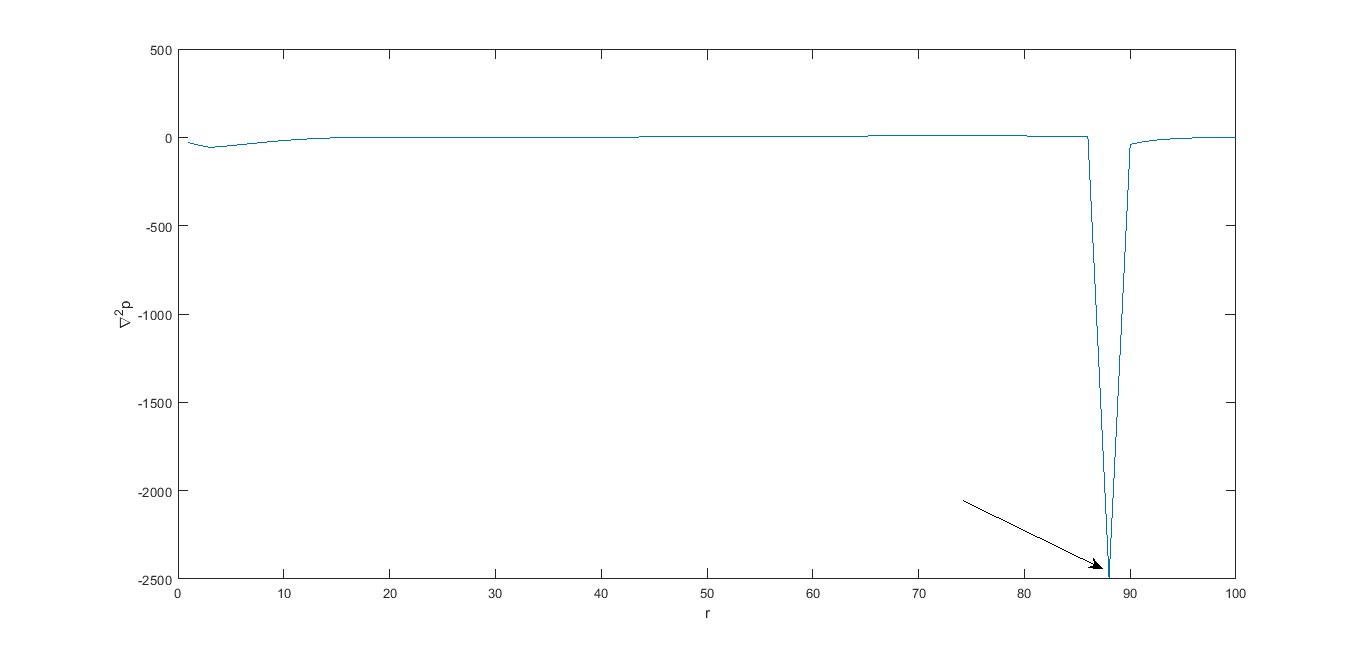
I have a plot as attached herewith in which the value of the point as shown by arrow mark is to be determined and compared to a reference value. It is plotted at a time step of 999 (t ranges from 1 to 1000).
global data;
cp=0;
for i=999:max(length(data.variable.t))
for j=60:max(length(data.variable.x))-1
if data.variable.curvepressure(i,j) <= -10.2661
disp(data.variable.curvepressure(i,j))
cp=1;
break
end
end
end
The above code is not working and need your advice please.
1 commentaire

Athanasios Paraskevopoulos
le 30 Juil 2024
Good! What exactly is your question? Do you want to create this plot?
Réponse acceptée

Piyush Kumar
le 30 Juil 2024
Modifié(e) : Piyush Kumar
le 30 Juil 2024
0 votes
The code you have written will display the values less than or equal to -10.2661. The break you are using will break only from the inner loop. The outer loop continues execution.
From the subject "How to determine the minimum point of a plot?", it seems like you want to find global minima of the plot. However, the provided code does not find the global minimum of the plot.
Plus de réponses (1)

AKennedy
le 30 Juil 2024
A function can help you with finding the minimum value of your plot. You can define the function as follows:
Inputs:
- data: The data to be analyzed. This could be a vector, matrix, or structure depending on the data format.
Outputs:
- min_value: The minimum value found in the data.
- min_index: The index of the minimum value in the data.
function [min_value, min_index] = find_plot_minimum(data)
% Assuming data is a vector
if isempty(data)
min_value = NaN;
min_index = NaN;
return;
end
[min_value, min_index] = min(data);
end
You can use this as an outline to find the minimum value from your plot and tweak it to suit your needs.
You can get additional info on the min function here: https://www.mathworks.com/help/matlab/ref/min.html
8 commentaires

Walter Roberson
le 30 Juil 2024
In that code, min() will be applied along the first non-scalar dimension of data . In the second output argument, min() will return the indices of the minimum value relative to that first non-scalar dimension . The result will be an array with that first non-scalar dimension "collapsed"
For example if data is 1 x 3 x 2 then the output will be 1 x 1 x 2 reflecting the indices of the minimums of (1,:,1) and (1,:,2)
It is common for min() to be applied to a vector, in which case the second output will be the index into the vector where the minimum occurs.

Rahul
le 30 Juil 2024
Walter Roberson
le 30 Juil 2024
You need to assign two outputs from the function
[min_value, min_index] = find_plot_minimum(YourDataGoesHere)
Walter Roberson
le 31 Juil 2024
length() is already a scalar, so max(length) is not doing anything useful for you.
Declaring data as a global while data is already passed in, is going to be an error soon.
You are overwriting min_value and min_index every iteration of your loops.
data.variable.gradpressure(i,j) will never be empty. If data.variable.gradpressure is numeric then (i,j) indexing will result in a scalar numeric output; If data.variable.gradpressure is a cell array, then (i,j) indexing will result in a cell array containing something
Anyhow, you need to run the function and record both outputs. You would invoke it with something like
[Output_min_value, Output_min_index] = find_plot_minimum(YourData)
This is invoking the code, not what should go onto the function line.
Walter Roberson
le 31 Juil 2024
If it is "uploaded in workspace" then you should be able to just reference it by name.
Not enough input arguments.
You need to pass data to the function.
Variables are passed by reference, not by value, so as long as it is known in the calling workspace, passing it in is fast and cheap.
%calling routine
YourData = .... something appropriate
[Output_min_value, Output_min_index] = find_plot_minimum(YourData)
Catégories
En savoir plus sur Graphics Performance dans Centre d'aide et File Exchange
le 30 Juil 2024
le 31 Juil 2024
Community Treasure Hunt
Find the treasures in MATLAB Central and discover how the community can help you!
Start Hunting!
Translated by 

