

Agree, super annoying that when you put units into a table - they aren't displayed.
Can I add units to the table?
72 vues (au cours des 30 derniers jours)
Afficher commentaires plus anciens
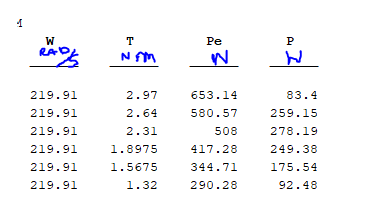
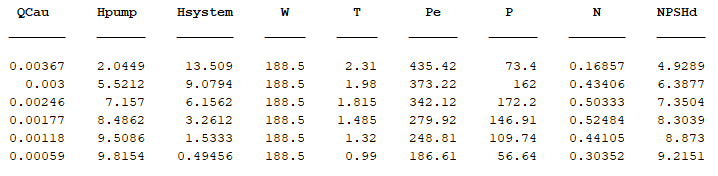
Can I add units to the variables in the table? I have searched for information and I could not find anything, it can only be done in numbers ...please help
7 commentaires



Walter Roberson
le 28 Juil 2024

Paul
le 28 Juil 2024
Modifié(e) : dpb
le 29 Juil 2024
Sure, enough. They don't even get checked when co[n]catenating tables.
T1 = table([1;2;3],'VariableNames',{'x'}); T1.Properties.VariableUnits = {'sec'};
T2 = table(2*[1;2;3],'VariableNames',{'x'}); T2.Properties.VariableUnits = {'m'};
summary([T1;T2])
summary([T2;T1])
Réponses (2)

Raj
le 17 Mai 2019
"Can I add units to the variables in the table?" Yes you can. You can specify units for each variable in the table by modifying the table property,
% |VariableUnits|.
Specify the variable units as a cell array of character vectors.
Something like this:
table (W,T,Pe,P)
T.Properties.VariableUnits = {'Rad/S','NM','N','N'}; % what I could make out from your picture. Please correct if wrong.
Or Do you want the units to get displayed on your table? Please be clear.
9 commentaires


Walter Roberson
le 15 Déc 2020
table() are not designed for presentation purposes. Report Generator has facilities for better output of tables.
That said, it would seem to me to be a small thing to add the units or the Variable Description information (which might be the original names of the variables.) It could even be made into properties as to whether to display them or not. I don't know why Mathworks has not done this.
table() could also benefit from a per-variable format specification... among other things.

dpb
le 28 Juil 2024
t=array2table([[0:2].',rand(3,1)],'VariableNames',{'Time','Velocity'});
t.Properties.VariableUnits={'sec','mph'}
Indeed to all...there's already room for them with a blank line just waiting to be used for something besides wasted white space.

KSSV
le 17 Mai 2019
It is not allowed...may be you can use something like this:
varNames = {'Name', 'Age_in_Years'} ;
varTypes = {'string','double'};
s = {'Tom' ; 'Dick' ; 'Hary'} ;
a = [20 ;21; 24] ;
T = table(s,a) ;
T.Properties.VariableNames = varNames
0 commentaires
Voir également
Catégories
En savoir plus sur Creating, Deleting, and Querying Graphics Objects dans Help Center et File Exchange
Community Treasure Hunt
Find the treasures in MATLAB Central and discover how the community can help you!
Start Hunting!
Translated by 

Vous pouvez également sélectionner un site web dans la liste suivante :
Amériques
- América Latina (Español)
- Canada (English)
- United States (English)
Europe
- Belgium (English)
- Denmark (English)
- Deutschland (Deutsch)
- España (Español)
- Finland (English)
- France (Français)
- Ireland (English)
- Italia (Italiano)
- Luxembourg (English)
- Netherlands (English)
- Norway (English)
- Österreich (Deutsch)
- Portugal (English)
- Sweden (English)
- Switzerland
- United Kingdom(English)
Asie-Pacifique
- Australia (English)
- India (English)
- New Zealand (English)
- 中国
- 日本Japanese (日本語)
- 한국Korean (한국어)