3D Point Cloud - Gaussian Curvature
Afficher commentaires plus anciens
Hello All.
I have a 3D point cloud data (X [m]; Y[m]; Z[m]). And I want to calculate the value of some curvature (e.g. gaussian) in every point of the point cloud. Based on these curvature information I would select the points, that may belong to some geometric shape in the point cloud (e. g. to some planes, spheres etc.).
Is there a built in function for it in Matlab, like normals() for normal vector estimation? Or does anyone know a way how to do this? It should be fast and dont need to be really precise, because it is only a pre-processing step.
Thanks in Advance,
Richard
Réponse acceptée

darova
le 26 Nov 2019
one way
clc,clear
% generate some data
r = 3;
t = linspace(0,10)';
x = r*cos(t);
y = r*sin(t);
z = sin(1*t);
t1 = t(2:end) - diff(t)/2;
dv = diff([x y z])./diff([t t t]); % first derivative at midpoints
d2v= diff(dv)./diff([t1 t1 t1]); % second derivative at points [2:end-1]
dv = 1/2*( dv(1:end-1,:) + dv(2:end,:) );% first derivative at points [2:end-1]
[dx,dy,dz] = deal( dv(:,1),dv(:,2),dv(:,3) );
[d2x,d2y,d2z] = deal( d2v(:,1),d2v(:,2),d2v(:,3) );
% curvature
kk = (d2z.*dy - d2y.*dz).^2 + (d2x.*dz - d2z.*dx).^2 + (d2y.*dx - d2x.*dy).^2;
kk = sqrt(kk) ./ (dx.^2+dy.^2+dz.^2).^(3/2);
% radius
RR1 = 1./kk;
plot(t(2:end-1),RR1)

10 commentaires

RiHo
le 26 Nov 2019
Thank you for your answer darova. It is almost the thing, what I looking for. :)
But the problem with this is that, I dont know, how to determine the t. Because I have a 3D scanned point cloud (e.g. a point cloud from a building scan or something), where you can have lot of shapes, so its not only one curve.
For example: 
With a CloudCompare software its possible to calculate the Gaussian curvature in every point of the point cloud, and then you get this:
You can see, that the points belonging to these small spheres are in green color.
I want to get something similar. So some curvature information in every point.
Thanks,
Richard
darova
le 26 Nov 2019
Do you have neighbouring points? Or you have only points (cloud)?
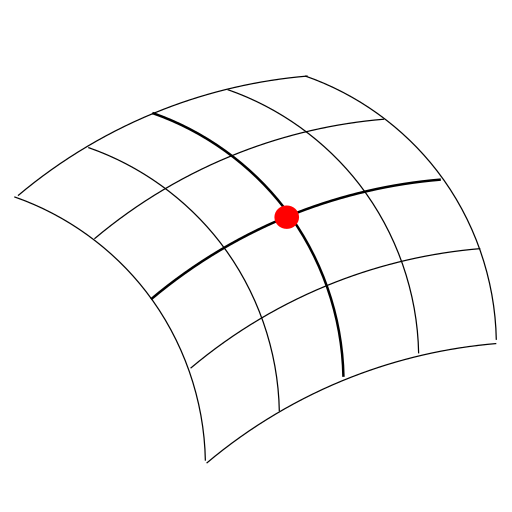
Surface curvate depends on plane

darova
le 26 Nov 2019
Two different curvatures, depends on defying a plane

RiHo
le 4 Déc 2019
darova
le 4 Déc 2019
Can you show plane at which you want to compute curvature?
RiHo
le 4 Déc 2019

Fig. - Points lying on the surface of the sphere in 2D with 2 planes fitted in 2 picked points.
Legend:
Black - points of the cloud, lying on the surface of a sphere;
Blue, Yellow - 2 picked points, with its plane fitted in 5 nearest neighbour;
Red - 5 neighbours for the Blue piced point;
Green - 5 neighbours for the Yellow piced point.
So I want to calculate the curvature in each point of the point cloud. For example using 5 neighboring points for calculation. Or maybe otherwise, idk.
But like I said this point cloud is a complex pointcloud containing lot of shapes, etc. (see the picture from the previous comments).
I hope it's understandable.
darova
le 4 Déc 2019
Can you create a surface from the point cloud? Can you use surfnorm?
RiHo
le 4 Déc 2019
darova
le 4 Déc 2019
If you can get normals for neighbouring points:
alpha = acos(dot(n1,n2));


Plus de réponses (0)
Catégories
En savoir plus sur Process Point Clouds dans Centre d'aide et File Exchange
Community Treasure Hunt
Find the treasures in MATLAB Central and discover how the community can help you!
Start Hunting!
Translated by 

