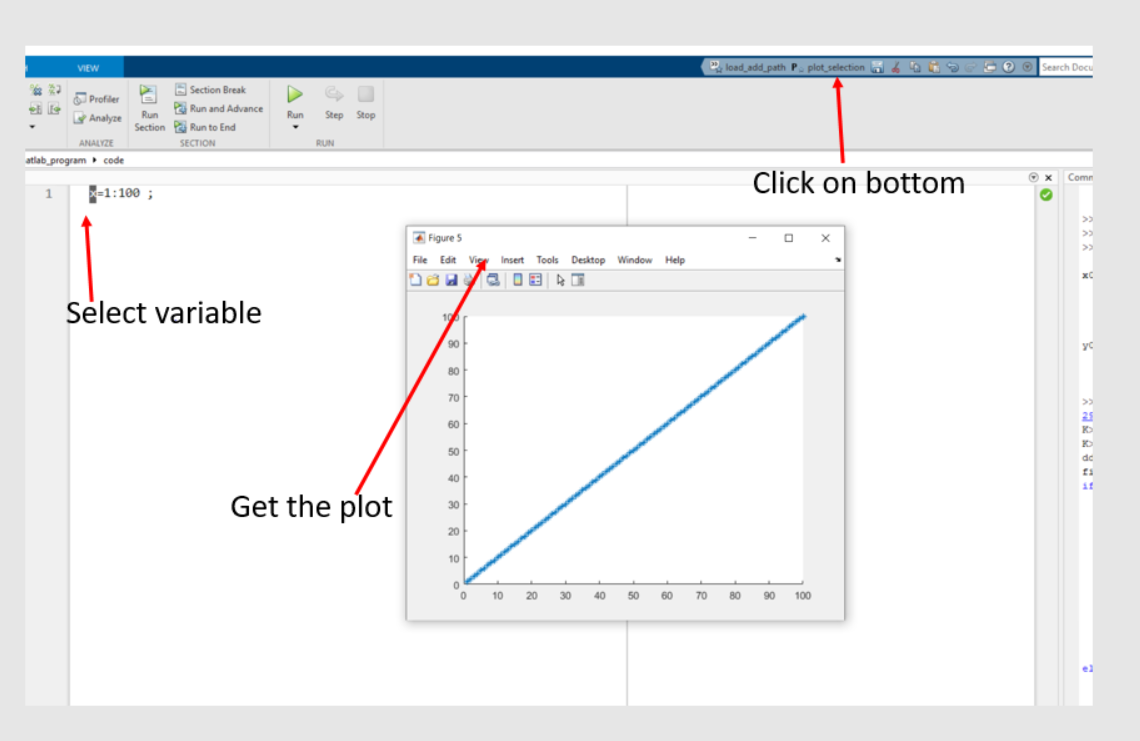
select and plot
Version 1.0.1 (1,24 ko) par
Abhishek Shahi
This script plot a variable that selected in editor, quickly. select the part you want to plot from the editor modify this as per your use.

Process:
- Paste the following script into Matlab's command window, ignoring the error for now.
- Select the section of 'same script' from the command history.
- Choose 'Create Favorite'
- On the pop-up window, select your desired name
- Now a 'Favorite botton' should apear on top right hand side of matlab interface.
- to check the code : select a vaiable from the editor
- click on 'Favorite botton'
- Plot should appear if your variable exist, reasonable
- feel free to change the code as per your use
%%%%%%%%%%%%%%%%%%%
SSSelection1=matlab.desktop.editor.getActive ;
ddata= eval(SSSelection1.SelectedText) ;
figure; hold on
if isa(ddata,'cell')==1
for iiiii=1:length(ddata)
[rrrow1,cccol1] = size(ddata{iiiii}) ;
if (rrrow1 == 1) | (cccol1 == 1)
nexttile
plot(ddata{iiiii}, '-*')
else
nexttile
imagesc(ddata{iiiii})
axis image
end
end
elseif isa(ddata,'double')==1
[rrrow1,cccol1] = size(ddata) ;
if (rrrow1 == 1) | (cccol1 == 1)
plot(ddata, '-*')
else
imagesc(ddata)
axis image
end
end
clearvars SSSelection1 dddata rrrow1 col1 iiiii
%%%%%%%%%%%%%%%%%%%%
Citation pour cette source
Abhishek Shahi (2026). select and plot (https://fr.mathworks.com/matlabcentral/fileexchange/120188-select-and-plot), MATLAB Central File Exchange. Extrait(e) le .
Compatibilité avec les versions de MATLAB
Créé avec
R2022b
Compatible avec toutes les versions
Plateformes compatibles
Windows macOS LinuxTags
Découvrir Live Editor
Créez des scripts avec du code, des résultats et du texte formaté dans un même document exécutable.
| Version | Publié le | Notes de version | |
|---|---|---|---|
| 1.0.1 | same script as a code |
||
| 1.0.0 |