Figure Management Utilities

These M-files are a collection of utilities for managing groups of figures on multiple monitors.
3,4K téléchargements
Mise à jour 11 oct. 2006

Afficher la licence

These M-files are a collection of utilities for managing groups of figures. The concept of a figure group is introduced as a collection of figures which may be treated as a single group. A figure group can be tiled on the screen with any desired layout. New groups can be created or a group or can be formed from figures already created. A figure group can also be simply brought to the front of the display screen. These utilities support multiple monitor displays, also known as the extended desktop, though figure groups do not span more than one monitor.

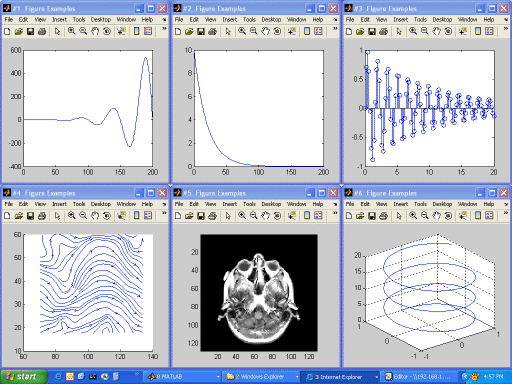
Actions such as tiling, creating, and viewing can create figure groups. In the attached figure is an example of 6 figures tiled on the screen with room for the taskbar.

Support is also provided for working with docked figures in the Matlab desktop using DOCKFIG and NEWDFIG. The utility MAXFIG will maximize a figure to fill the screen, remembering it's prior position and size. A subsequent call to MAXFIG will restore the figure. Two versions are provided for MAXFIG, NEWFIG, and TILEFIG in the folders "Windows" and "Platform Independent" to provide support for multiple monitors. The "Windows" versions use the root property "MonitorPositions" and thus may not work properly on all platforms and will not work for Matlab versions prior to version 7 (R14). The "Platform Independent" versions should work on earlier releases and all platforms.

Folder Contents
dockfig DOCK one or more FIGures.
newdfig create NEW Docked FIGures.
vf View one or more Figures.
getfigdim GET FIGure DIMensions.

Platform Independent Folder
maxfig MAXimize a FIGure to fill the screen.
newfig create NEW FIGures.
tilefig TILE 1 or more FIGures.

Windows Folder
maxfig MAXimize a FIGure to fill the screen.
newfig create NEW FIGures.
tilefig TILE 1 or more FIGures.
getmondim GET MONitor DIMensions.
screenxyabs SCREEN X-Y ABSolute coordinates.
screenxymon SCREEN X-Y MONitor coordinates.

Citation pour cette source

Mirko Hrovat (2026). Figure Management Utilities (https://fr.mathworks.com/matlabcentral/fileexchange/12607-figure-management-utilities), MATLAB Central File Exchange. Extrait(e) le .

Compatibilité avec les versions de MATLAB
Créé avec R2006a
Compatible avec toutes les versions
Plateformes compatibles
Windows macOS Linux
Catégories
En savoir plus sur Interactive Control and Callbacks dans Help Center et MATLAB Answers
Version Publié le Notes de version
1.0.0.0