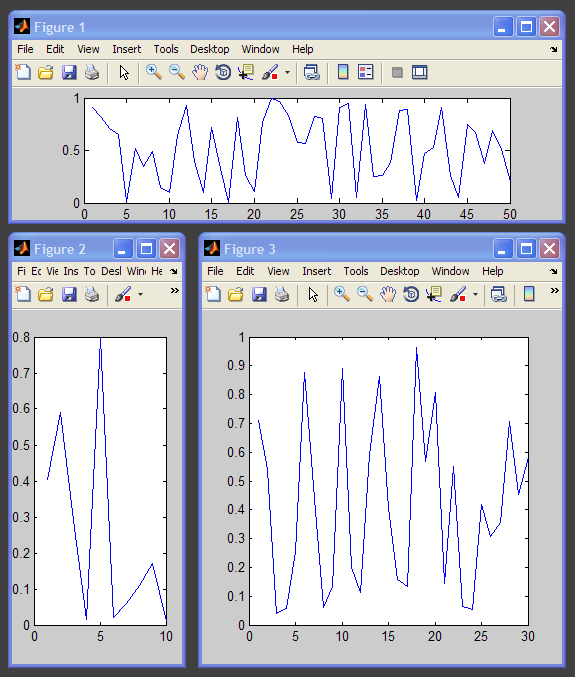
subfigure

Create a figure within a grid-based layout. Like subplot, but for figures.

Vous suivez désormais cette soumission

subfigure(m,n,p), or subfigure(mnp), divides the screen into an m-by-n grid of tiles and creates a figure within the pth tile. Tiles are counted along the top row of the screen, then the second row, etc.

If p is a vector, the figure is sized to cover all the subfigure positions listed in p.

subfigure(m,n) creates a figure showing a m-by-n grid layout with tiles labeled in the order that they are numbered by subfigure. This is useful for planning screen layouts, especially when one or more subfigures will span multiple tiles (when p is a vector).

h = subfigure(...) returns a handle to the figure.

Every call to subfigure creates a new figure even if a figure exists at the location specified by m, n, and p. The existing figure is not made current or reused. Existing figures that are overlapped by new subfigures are not deleted. This behavior is dissimilar to subplot.

Example 1: Four non-overlapping figures.

subfigure(2,2,1)
subfigure(2,2,2)
subfigure(2,2,3)
subfigure(2,2,4)

Example 2: Three non-overlapping figures of various sizes.

subfigure(4,4,[1 13])
subfigure(4,4,[2 4])
subfigure(4,4,[6 16])

Example 3: Show the grid for a 3 x 5 layout.

subfigure(3,5)

Citation pour cette source

Steve Hoelzer (2026). subfigure (https://fr.mathworks.com/matlabcentral/fileexchange/23426-subfigure), MATLAB Central File Exchange. Extrait(e) le .

Remerciements

Inspiré par : SUBFIGURE

A inspiré : The Krouchev Journal-Figure Advanced MATLAB Toolkit

Informations générales

Compatibilité avec les versions de MATLAB

  • Compatible avec toutes les versions

Plateformes compatibles

  • Windows
  • macOS
  • Linux
Version Publié le Notes de version Action
1.0.0.0