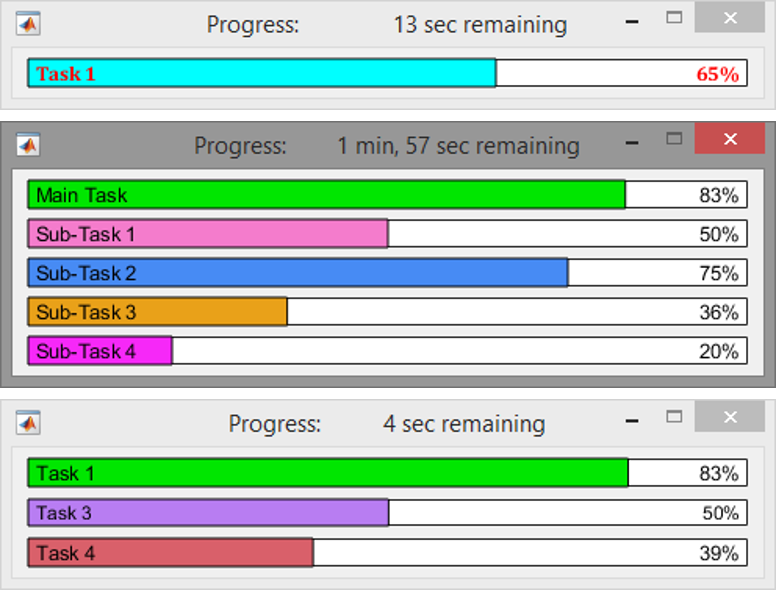

This function is an adaptation of Steve Hoelzer's progressbar.m function. It provides similar features, but with improvements to behavior when utilizing multiple task bars as well as several bug fixes. Many thanks go out to Steve for his initial ground work and for inspiring this function.
Features:
- Provides a graphical representation to indicate task completion for
loops and nested-loops. (Time remaining and percentage complete).
- Supports multiple taskbars in a single figure (nested-loops).
- Provides enhanced execution times when compared to similar functions.
- Progress() function can be used with minimal lines of code.
- Simple to update, add, remove, and/or rename/reset taskbars to the
main figure.
- Optional taskbars labels.
- Figure closes automatically when primary task is 100%.
- Only one progress bar figure can exist to prevent desktop clutter.
- Displays progress bar figure on top of other windows.
(Designed for Windows 8 and may not work with other systems.)
- Progress bar figure can be deleted during a loop without errors.
- Works in loops that target other axes objects.
- Display options for taskbar color and font.
- Randomizes taskbar color when mouse-clicked. For Fun!
m = 1e3;
n = m/2;
o = 1e4;
t = 0.0005;
Opts = {'color','cyan',...
'fontname','cambria',...
'fontweight','bold',...
'fontcolor',[1,0,0]}; % Display options [cell]
Progress('Plotting',Opts) % Initializes figure with 1 taskbar and display options
x = 0:0.005:2*pi;
np = length(x);
for i=1:np
plot(x,sin(x+6*x(i)),x,cos(x+13*x(i)));grid on
Progress(i/np) % Updates the taskbar progress
pause(t)
end
close
Opts = {'color',[0.3,0.3,0.3],...
'fontweight','bold',...
'fontcolor','green'}; % Display options [cell]
Progress('Task 1','Task 2',Opts) % Initializes figure with 2 taskbars and display options
for i=1:m
Progress(i/(m+n),i/m) % Updates both taskbars
pause(t)
end
Progress([],'Task 3') % Renames/resets the 2nd taskbar
for i=1:n
Progress((m+i)/(m+n),i/n) % Updates taskbars 1 & 2 (removes all others if present)
pause(t)
if i==n/2
Progress([],[],'Task 4') % Adds a 3rd taskbar
for j=1:o
Progress((m+i+j/o)/(m+n),(i+j/o)/n,j/o) % Updates all 3 taskbars
pause(t)
end
end
end
Citation pour cette source
Allen (2026). Progress (https://fr.mathworks.com/matlabcentral/fileexchange/67913-progress), MATLAB Central File Exchange. Extrait(e) le .
Compatibilité avec les versions de MATLAB
Plateformes compatibles
Windows macOS LinuxCatégories
Tags
Remerciements
Inspiré par : progressbar
Community Treasure Hunt
Find the treasures in MATLAB Central and discover how the community can help you!
Start Hunting!Découvrir Live Editor
Créez des scripts avec du code, des résultats et du texte formaté dans un même document exécutable.
| Version | Publié le | Notes de version | |
|---|---|---|---|
| 1.3 | Added functionality to change the taskbar appearance. Also makes it easier to add, remove, and/or rename/reset taskbars to an existing figure. Various minor bug fixes. |
||
| 1.0.0.0 | Added thumbnail image to file exchange.
|