mx_task

Version 1.0.2 (97,7 ko) par Carlos Ma
A simple to use MATLAB library for "real-time" multi-tasking.
37 téléchargements
Mise à jour 29 juil. 2019

# mx_task
A simple to use MATLAB library for "real-time" multi-tasking.

Multitasking with tic-toc and robotics.Rate require full CPU usage which is sometimes undesired.

The new mx_task class allows users to achieve an almost real-time multitasking functionality in MATLAB, whilst not requiring full CPU usage.

---
Supports Linux and Windows. Linux systems generally have a better RT behaviour.

Functionality verified on:
- a 18.04LTS machine with MATLAB R2016b and R2019a,
- a Windows 10 machine with MATLAB R2018b.

Example 0 shows the basic functionalities of the mx_task library.

Example 1 shows how to implement multi-tasking.

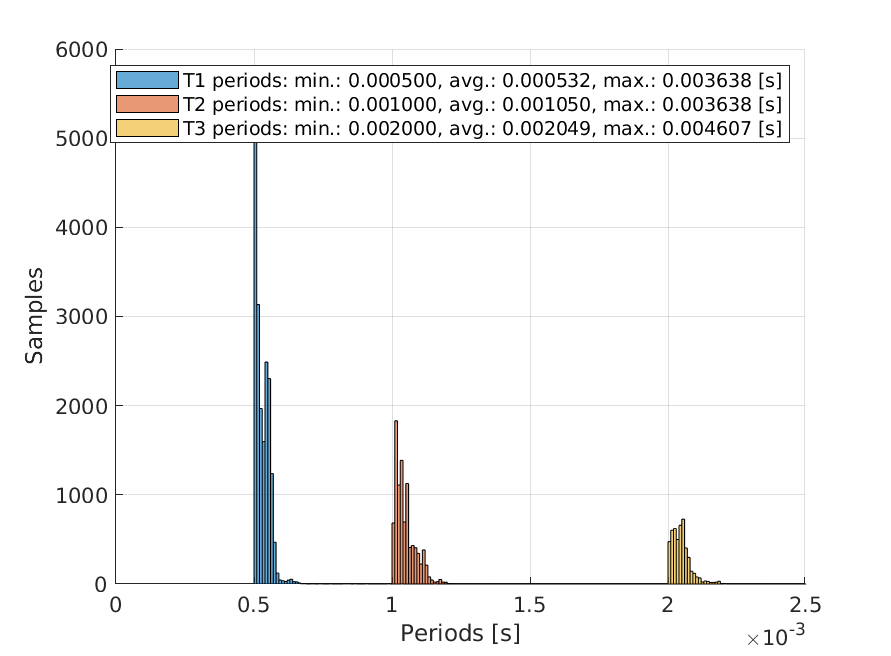
Example 2 is a benchmarking script for comparisons between the scheduling capabilities of mx_task, tictoc, and robotics.Rate.

# Usage
1. First define a task with a function and affix it to a new mx_task instance. Define the desired task period at the second input.

myTask = mx_task(@()myFunc, 1/10);

function myFunc()

fprintf("Hello world.\n");

end

2. Capture the start time in [seconds since epoch] with mx_sleep().

time_start = mx_sleep(0); % sleeps for 0 seconds

time_now = time_start;

3. Create a while loop with a simulation time trap in the condition. mx_sleep for 1us for an almost real-time scheduling quality. Run task by task.run(time_now).

while (time_now <= time_start + 10) % run tasks for 10 seconds.

time_now = mx_sleep(1/1000000); % 1MHz scheduler frequency. Set to mx_sleep(0) for an enhanced real-time behaviour (at 100% CPU though).

myTask.run(time_now);

end

# Installation
Move to the mx_task directory and run the install script.

Citation pour cette source

Carlos Ma (2026). mx_task (https://github.com/carl0sma/mx_task), GitHub. Extrait(e) le .

Compatibilité avec les versions de MATLAB
Créé avec R2019a
Compatible avec les versions R2016b à R2019a
Plateformes compatibles
Windows macOS Linux
Catégories
En savoir plus sur Performance and Memory dans Help Center et MATLAB Answers

Les versions qui utilisent la branche GitHub par défaut ne peuvent pas être téléchargées

Version Publié le Notes de version
1.0.2

Validated Windows compatibility. A Linux system is still recommended for superior RT performances.

1.0.1

Validated Windows support, although its RT behaviour is much worse than at on a Linux system.

1.0.0

Pour consulter ou signaler des problèmes liés à ce module complémentaire GitHub, accédez au dépôt GitHub.