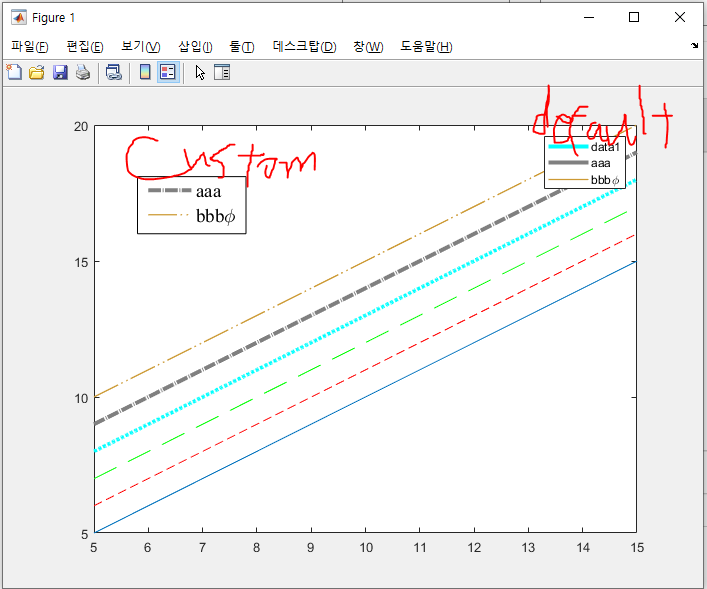
Custom line style for plot function
Version 1.0.3 (6,38 ko) par
Seongmun Jung
Use your custom line style
Use your custom line style with function named plot_dash
You can design your line pattern and its length by the parameter spec_ and num_
For instance,
- Matlab default dashed line ∽ spec_ = [1, 0.5], n_ = 27.1
- Matlab default solid line = spec_ = [1, 0.0], n_ = any number but 1 recommanded
- Matlab default dotted line ∽ You can do it with this code, but just use matlab default option to save your memory (50 points are created per one pattern)
- Long dashed line ∽ spec_ = [1, 0.5], n_ = 10
- Dashed dot line ∽ spec_ = [1, 0.1, 0.1, 0.1], n_ = 26
- ...
This line style is not shown for the Matlab's default legend function.
So, I provide not-sophisticated additional functions
See example codes and you'll get it.
P.S.
- Odd components of spec_ is length of solid part of the pattern
- Even components of spec_ is length of empty part of the pattern
- There's no limit for the spec_'s dimension
- However, dimension of the spec_ should be even number
- n_ is the number of patterns that can be fitted in the line x = xlim, y = [0, 0]
- Don't worry. It works based on the curve length, not the x array
Citation pour cette source
Seongmun Jung (2026). Custom line style for plot function (https://fr.mathworks.com/matlabcentral/fileexchange/97512-custom-line-style-for-plot-function), MATLAB Central File Exchange. Extrait(e) le .
Compatibilité avec les versions de MATLAB
Créé avec
R2021a
Compatible avec toutes les versions
Plateformes compatibles
Windows macOS LinuxTags
Découvrir Live Editor
Créez des scripts avec du code, des résultats et du texte formaté dans un même document exécutable.
| Version | Publié le | Notes de version | |
|---|---|---|---|
| 1.0.3 | 1. Changed functions' names
|
||
| 1.0.2 | TYPO |
||
| 1.0.1 | Correcting typo |
||
| 1.0.0 |