sph2cart
R2026bTransform spherical coordinates to Cartesian
Description
Examples
Convert the spherical coordinates defined by corresponding entries in the matrices az, el, and r to Cartesian coordinates x, y, and z. These points correspond to the eight vertices of a cube.
az = [0.7854 0.7854 -0.7854 -0.7854; 2.3562 2.3562 -2.3562 -2.3562]
az = 2×4

    0.7854    0.7854   -0.7854   -0.7854
    2.3562    2.3562   -2.3562   -2.3562
el = [0.6155 -0.6155 0.6155 -0.6155; 0.6155 -0.6155 0.6155 -0.6155]
el = 2×4

    0.6155   -0.6155    0.6155   -0.6155
    0.6155   -0.6155    0.6155   -0.6155
r = 1.7321*ones(2,4)
r = 2×4

    1.7321    1.7321    1.7321    1.7321
    1.7321    1.7321    1.7321    1.7321
[x,y,z] = sph2cart(az,el,r)
x = 2×4

    1.0000    1.0000    1.0000    1.0000
   -1.0000   -1.0000   -1.0000   -1.0000
y = 2×4

    1.0000    1.0000   -1.0000   -1.0000
    1.0000    1.0000   -1.0000   -1.0000
z = 2×4

    1.0001   -1.0001    1.0001   -1.0001
    1.0001   -1.0001    1.0001   -1.0001
Input Arguments
Azimuth angle, specified as a scalar, vector, matrix, or multidimensional
array. azimuth must be real. azimuth,
elevation, and r must either be
the same size or have sizes that are compatible (for example,
azimuth is an
M-by-N matrix,
elevation is a scalar, and r is a
scalar or 1-by-N row vector). For more
information, see Compatible Array Sizes for Basic Operations.
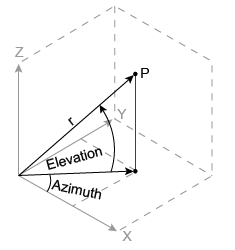
azimuth is the counterclockwise angle in the
x-y plane measured in radians from
the positive x-axis.
Data Types: single | double
Elevation angle, specified as a scalar, vector, matrix, or
multidimensional array. elevation must be real.
azimuth, elevation, and
r must either be the same size or have sizes that are
compatible.
elevation is the elevation angle in radians from the
x-y plane.
Data Types: single | double
Radius, specified as a scalar, vector, matrix, or multidimensional array.
r must be real. azimuth,
elevation, and r must either be
the same size or have sizes that are compatible.
The length units of r can be arbitrary, and the output
arrays x, y, and z
use the same units.
Data Types: single | double
Output Arguments
Cartesian coordinates, returned as arrays.
Algorithms
The mapping from spherical coordinates to three-dimensional Cartesian coordinates is
x = r .* cos(elevation) .* cos(azimuth)
y = r .* cos(elevation) .* sin(azimuth)
z = r .* sin(elevation)
Extended Capabilities
The
sph2cart function fully supports tall arrays. For more
information, see Tall Arrays.
Usage notes and limitations:
If you use
sph2cartwith single type and double type operands, the generated code might not produce the same result as MATLAB®. See Binary Element-Wise Operations with Single and Double Operands (MATLAB Coder).
Refer to the usage notes and limitations in the C/C++ Code Generation section. The same usage notes and limitations apply to GPU code generation.
The sph2cart
function fully supports thread-based environments. For more information, see Run MATLAB Functions in Thread-Based Environment.
The
sph2cart function fully supports GPU arrays.
To run the function on a GPU, specify the input data as a gpuArray (Parallel Computing Toolbox). For more
information, see Run MATLAB Functions on a GPU (Parallel Computing Toolbox).
The
sph2cart function fully supports distributed arrays. For more
information, see Run MATLAB Functions with Distributed Arrays (Parallel Computing Toolbox).
Version History
Introduced before R2006aThe sph2cart function returns an error for complex inputs. This
function no longer accepts complex inputs because its inverse function, cart2sph, does not accept complex inputs.
To preserve the behavior of previous releases for complex inputs, use the formulas that map spherical coordinates to Cartesian coordinates, as shown in this table.
| Not Recommended (Errors) | Recommended |
|---|---|
azimuth = 1i; elevation = 2i; r = 1; [x,y,z] = sph2cart(azimuth,elevation,r); |
azimuth = 1i; elevation = 2i; r = 1; x = r*cos(elevation)*cos(azimuth); y = r*cos(elevation)*sin(azimuth); z = r*sin(elevation); |
MATLAB Command
You clicked a link that corresponds to this MATLAB command:
Run the command by entering it in the MATLAB Command Window. Web browsers do not support MATLAB commands.


Sélectionner un site web
Choisissez un site web pour accéder au contenu traduit dans votre langue (lorsqu'il est disponible) et voir les événements et les offres locales. D’après votre position, nous vous recommandons de sélectionner la région suivante : .
Vous pouvez également sélectionner un site web dans la liste suivante :
Comment optimiser les performances du site
Pour optimiser les performances du site, sélectionnez la région Chine (en chinois ou en anglais). Les sites de MathWorks pour les autres pays ne sont pas optimisés pour les visites provenant de votre région.
Amériques
- América Latina (Español)
- Canada (English)
- United States (English)
Europe
- Belgium (English)
- Denmark (English)
- Deutschland (Deutsch)
- España (Español)
- Finland (English)
- France (Français)
- Ireland (English)
- Italia (Italiano)
- Luxembourg (English)
- Netherlands (English)
- Norway (English)
- Österreich (Deutsch)
- Portugal (English)
- Sweden (English)
- Switzerland
- United Kingdom (English)