ClassificationXGBoost Predict
R2026bClassificationXGBoost Predict block
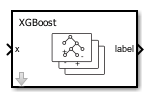
To add a block to a model, double-click the canvas and start typing the block name. Then, select the block from the list.
Libraries:
Statistics and Machine Learning Toolbox /
Classification
Description
The ClassificationXGBoost Predict block classifies observations using an
XGBoost classification object (CompactClassificationXGBoost) for multiclass classification.
Import a trained classification object into the block by specifying the name of a workspace variable that contains the object. The input port x receives an observation (predictor data), and the output port label returns a predicted class label for the observation. The optional output port score returns the predicted class scores or posterior probabilities.
Examples
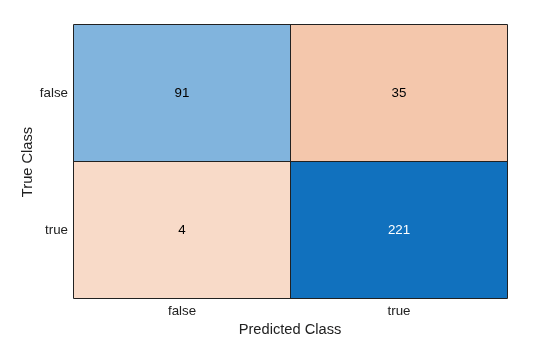
Predict Class Labels Using ClassificationXGBoost Predict Block
Use the ClassificationXGBoost Predict block for label prediction.
Ports
Input
Predictor data, specified as a row or column vector of one observation.
The variables in x must have the same order as the predictor variables that trained the model specified by Select trained machine learning model.
Data Types: single | double | half | int8 | int16 | int32 | int64 | uint8 | uint16 | uint32 | uint64 | Boolean | fixed point
Output
Predicted class label, returned as a scalar. The predicted class is the class that
minimizes the expected classification cost. For more details, see the predict
function reference page.
Data Types: single | double | half | int8 | int16 | int32 | int64 | uint8 | uint16 | uint32 | uint64 | Boolean | fixed point | enumerated
Predicted class scores or posterior probabilities, returned as a row vector of
size 1-by-k, where k is the number of classes in
the XGBoost model. The classification score Score(i) represents the
posterior probability that the observation in x belongs to class
i.
To check the order of the classes, use the ClassNames
property of the XGBoost model specified by Select trained machine
learning model.
Dependencies
To enable this port, select the check box for Add output port for predicted class scores on the Main tab of the Block Parameters dialog box.
Data Types: single | double | half | int8 | int16 | int32 | int64 | uint8 | uint16 | uint32 | uint64 | fixed point
Parameters
To edit block parameters interactively, use the Property Inspector. From the Simulink® Toolstrip, on the Simulation tab, in the Prepare gallery, select Property Inspector.
Main
Specify the name of a workspace variable that contains a CompactClassificationXGBoost object.
Programmatic Use
Block Parameter:
TrainedLearner |
| Type: workspace variable |
Values:
CompactClassificationXGBoost object |
Default:
"xgbMdl" |
Select the check box to include the second output port score in the ClassificationXGBoost Predict block.
Programmatic Use
Block Parameter:
ShowOutputScore |
| Type: character vector or string |
Values:
"off" | "on" |
Default:
"off" |
Data Types
Fixed-Point Operational Parameters
Specify the rounding mode for fixed-point operations. For more information, see Rounding Modes (Fixed-Point Designer).
Block parameters always round to the nearest representable value. To control the rounding of a block parameter, enter an expression into the mask field using a MATLAB® rounding function.
Programmatic Use
Block Parameter:
RndMeth |
| Type: character vector |
Values:
"Ceiling" | "Convergent" | "Floor" | "Nearest" | "Round" | "Simplest" |
"Zero" |
Default:
"Floor" |
Specify whether overflows saturate or wrap.
| Action | Rationale | Impact on Overflows | Example |
|---|---|---|---|
Select this check box
( | Your model has possible overflow, and you want explicit saturation protection in the generated code. | Overflows saturate to either the minimum or maximum value that the data type can represent. | The maximum value that the |
Clear this check box
( | You want to optimize the efficiency of your generated code. You want to avoid overspecifying how a block handles out-of-range signals. For more information, see Troubleshoot Signal Range Errors (Simulink). | Overflows wrap to the appropriate value that the data type can represent. | The maximum value that the |
Programmatic Use
Block Parameter:
SaturateOnIntegerOverflow |
| Type: character vector |
Values:
"off" | "on" |
Default:
"off" |
Select this parameter to prevent the fixed-point tools from overriding the data type you specify for the block. For more information, see Use Lock Output Data Type Setting (Fixed-Point Designer).
Programmatic Use
Block Parameter:
LockScale |
| Type: character vector |
Values:
"off" | "on" |
Default:
"off" |
Data Type
Specify the data type for the label output. The type can be
inherited, specified as an enumerated data type, or
expressed as a data type object such as Simulink.NumericType.
The supported data types depend on the labels used in the model specified by Select trained machine learning model.
If the model uses numeric or logical labels, the supported data types are
Inherit: Inherit via back propagation(default),double,single,half,int8,uint8,int16,uint16,int32,uint32,int64,uint64,boolean, fixed point, and a data type object.If the model uses nonnumeric labels, the supported data types are
Inherit: auto(default),Enum: <class name>, and a data type object.
When you select an inherited option, the software behaves as follows:
Inherit: Inherit via back propagation(default for numeric and logical labels) — Simulink automatically determines the Label data type of the block during data type propagation (see Data Type Propagation (Simulink)). In this case, the block uses the data type of a downstream block or signal object.Inherit: auto(default for nonnumeric labels) — The block uses an autodefined enumerated data type variable. For example, suppose the workspace variable name specified by Select trained machine learning model ismyMdl, and the class labels areclass 1andclass 2. Then, the corresponding label values aremyMdl_enumLabels.class_1andmyMdl_enumLabels.class_2. The block converts the class labels to valid MATLAB identifiers by using thematlab.lang.makeValidNamefunction.
For more information about data types, see Control Data Types of Signals (Simulink).
Click the Show data type assistant
button
to display the Data Type Assistant,
which helps you set the data type attributes. For more information, see Specify Data Types Using Data Type Assistant (Simulink).
Programmatic Use
Block Parameter:
LabelDataTypeStr |
| Type: character vector or string |
Values: "Inherit: Inherit via back
propagation" | "Inherit: auto" |
"double" | "single" |
"half" | "int8" |
"uint8" | "int16" |
"uint16" | "int32" |
"uint32" | "int64" |
"uint64" | "boolean" |
"fixdt(1,16,0)" | "fixdt(1,16,2^0,0)"
| "Enum: <class name>" | "<data type
expression>" |
Default: "Inherit: Inherit via
back propagation" (for numeric and logical labels) |
"Inherit: auto" (for nonnumeric labels) |
Specify the lower value of the label output range that Simulink checks.
Simulink uses the minimum value to perform:
Parameter range checking for some blocks (see Specify Minimum and Maximum Values for Block Parameters (Simulink)).
Simulation range checking (see Specify Signal Ranges (Simulink) and Enable Simulation Range Checking (Simulink)).
Optimization of the code that you generate from the model. This optimization can remove algorithmic code and affect the results of some simulation modes, such as software-in-the-loop (SIL) mode or external mode. For more information, see Optimize using the specified minimum and maximum values (Embedded Coder).
The Label data type Minimum parameter does not saturate or clip the actual label output signal. To do so, use the Saturation (Simulink) block instead.
Dependencies
You can specify this parameter only if the model specified by Select trained machine learning model uses numeric labels.
Programmatic Use
Block Parameter:
LabelOutMin |
| Type: character vector |
Values: "[]" |
scalar |
Default: "[]" |
Specify the upper value of the label output range that Simulink checks.
Simulink uses the maximum value to perform:
Parameter range checking for some blocks (see Specify Minimum and Maximum Values for Block Parameters (Simulink)).
Simulation range checking (see Specify Signal Ranges (Simulink) and Enable Simulation Range Checking (Simulink)).
Optimization of the code that you generate from the model. This optimization can remove algorithmic code and affect the results of some simulation modes, such as SIL or external mode. For more information, see Optimize using the specified minimum and maximum values (Embedded Coder).
The Label data type Maximum parameter does not saturate or clip the actual label output signal. To do so, use the Saturation (Simulink) block instead.
Dependencies
You can specify this parameter only if the model specified by Select trained machine learning model uses numeric labels.
Programmatic Use
Block Parameter:
LabelOutMax |
| Type: character vector |
Values: "[]" |
scalar |
Default: "[]" |
Specify the data type for the score output. The type can be
inherited, specified directly, or expressed as a data type object such as
Simulink.NumericType.
When you select Inherit: auto, the block uses a rule that
inherits a data
type.
For more information about data types, see Control Data Types of Signals (Simulink).
Click the Show data type assistant
button
to display the Data Type Assistant,
which helps you set the data type attributes. For more information, see Specify Data Types Using Data Type Assistant (Simulink).
Programmatic Use
Block Parameter:
ScoreDataTypeStr |
| Type: character vector or string |
Values: "Inherit: auto"
| "double" | "single" |
"half" | "int8" |
"uint8" | "int16" |
"uint16" | "int32" |
"uint32" | "int64" |
"uint64" | "fixdt(1,16,0)" |
"fixdt(1,16,2^0,0)" | "<data type
expression>" |
Default: "Inherit:
auto" |
Specify the lower value of the score output range that Simulink checks.
Simulink uses the minimum value to perform:
Parameter range checking for some blocks (see Specify Minimum and Maximum Values for Block Parameters (Simulink)).
Simulation range checking (see Specify Signal Ranges (Simulink) and Enable Simulation Range Checking (Simulink)).
Optimization of the code that you generate from the model. This optimization can remove algorithmic code and affect the results of some simulation modes, such as software-in-the-loop (SIL) mode or external mode. For more information, see Optimize using the specified minimum and maximum values (Embedded Coder).
The Score data type Minimum parameter does not saturate or clip the actual score output. To do so, use the Saturation (Simulink) block instead.
Programmatic Use
Block Parameter:
ScoreOutMin |
| Type: character vector |
Values: "[]" |
scalar |
Default: "[]" |
Specify the upper value of the score output range that Simulink checks.
Simulink uses the maximum value to perform:
Parameter range checking for some blocks (see Specify Minimum and Maximum Values for Block Parameters (Simulink)).
Simulation range checking (see Specify Signal Ranges (Simulink) and Enable Simulation Range Checking (Simulink)).
Optimization of the code that you generate from the model. This optimization can remove algorithmic code and affect the results of some simulation modes, such as SIL or external mode. For more information, see Optimize using the specified minimum and maximum values (Embedded Coder).
The Score data type Maximum parameter does not saturate or clip the actual score output. To do so, use the Saturation (Simulink) block instead.
Programmatic Use
Block Parameter:
ScoreOutMax |
| Type: character vector |
Values: "[]" |
scalar |
Default: "[]" |
Specify the data type for the outputs from weak learners. The type can be inherited, specified directly, or expressed as a data type object such as Simulink.NumericType.
When you select Inherit: auto, the block uses a rule that inherits a data type.
For more information about data types, see Control Data Types of Signals (Simulink).
Click the Show data type assistant
button
to display the Data Type Assistant,
which helps you set the data type attributes. For more information, see Specify Data Types Using Data Type Assistant (Simulink).
Programmatic Use
Block Parameter: WeakLearnerDataTypeStr |
| Type: character vector or string |
Values: "Inherit: auto" |
"double" | "single" | "half" |
"int8" | "uint8" | "int16" |
"uint16" | "int32" | "uint32" |
"int64" | "uint64" |
"fixdt(1,16,0)" | "fixdt(1,16,2^0,0)" |
"<data type expression>" |
Default: "Inherit: auto" |
Specify the lower value of the weak learner output range that Simulink checks.
Simulink uses the minimum value to perform:
Parameter range checking for some blocks (see Specify Minimum and Maximum Values for Block Parameters (Simulink)).
Simulation range checking (see Specify Signal Ranges (Simulink) and Enable Simulation Range Checking (Simulink)).
Optimization of the code that you generate from the model. This optimization can remove algorithmic code and affect the results of some simulation modes, such as software-in-the-loop (SIL) mode or external mode. For more information, see Optimize using the specified minimum and maximum values (Embedded Coder).
Note
The Weak learner data type Minimum parameter does not saturate or clip the actual weak learner output signals.
Programmatic Use
Block Parameter:
WeakLearnerOutMin |
| Type: character vector |
Values: "[]" |
scalar |
Default: "[]" |
Specify the upper value of the weak learner output range that Simulink checks.
Simulink uses the maximum value to perform:
Parameter range checking for some blocks (see Specify Minimum and Maximum Values for Block Parameters (Simulink)).
Simulation range checking (see Specify Signal Ranges (Simulink) and Enable Simulation Range Checking (Simulink)).
Optimization of the code that you generate from the model. This optimization can remove algorithmic code and affect the results of some simulation modes, such as SIL or external mode. For more information, see Optimize using the specified minimum and maximum values (Embedded Coder).
Note
The Weak learner data type Maximum parameter does not saturate or clip the actual weak learner output signals.
Programmatic Use
Block Parameter:
WeakLearnerOutMax |
| Type: character vector |
Values: "[]" |
scalar |
Default: "[]" |
Block Characteristics
Data Types |
|
Direct Feedthrough |
|
Multidimensional Signals |
|
Variable-Size Signals |
|
Zero-Crossing Detection |
|
More About
The data types of internal model parameters are
synchronized to the data type of the enabled score output port. If the
score output port is not enabled, the model parameter data types
are synchronized to other internal data types.
If your input signal contains nonfinite values, do one of the following to process the values:
Enable nonfinite support — On the Modeling tab, click Model Settings. In the Code Generation > Interface pane, under Software Environment, select the Support non-finite numbers check box.
Preprocess signals — Remove the nonfinite values from the signals before they reach the block by using imputation or filtering, for example.
Alternative Functionality
You can use a MATLAB Function (Simulink) block with the predict object
function of an XGBoost classification object (CompactClassificationXGBoost). For an example, see Predict Class Labels Using MATLAB Function Block.
When deciding whether to use the ClassificationXGBoost Predict block in the
Statistics and Machine Learning Toolbox™ library or a MATLAB Function block with the predict function, consider the
following:
If you use the Statistics and Machine Learning Toolbox library block, you can use the Fixed-Point Tool (Fixed-Point Designer) to convert a floating-point model to fixed point.
Support for variable-size arrays must be enabled for a MATLAB Function block with the
predictfunction.If you use a MATLAB Function block, you can use MATLAB functions for preprocessing or post-processing before or after predictions in the same MATLAB Function block.
Extended Capabilities
C/C++ Code Generation
Generate C and C++ code using Simulink® Coder™.
Fixed-Point Conversion
Design and simulate fixed-point systems using Fixed-Point Designer™.
Version History
Introduced in R2026b
See Also
Blocks
- ClassificationSVM Predict | ClassificationEnsemble Predict | ClassificationTree Predict | ClassificationNeuralNetwork Predict
Objects
Functions
MATLAB Command
You clicked a link that corresponds to this MATLAB command:
Run the command by entering it in the MATLAB Command Window. Web browsers do not support MATLAB commands.
Sélectionner un site web
Choisissez un site web pour accéder au contenu traduit dans votre langue (lorsqu'il est disponible) et voir les événements et les offres locales. D’après votre position, nous vous recommandons de sélectionner la région suivante : .
Vous pouvez également sélectionner un site web dans la liste suivante :
Comment optimiser les performances du site
Pour optimiser les performances du site, sélectionnez la région Chine (en chinois ou en anglais). Les sites de MathWorks pour les autres pays ne sont pas optimisés pour les visites provenant de votre région.
Amériques
- América Latina (Español)
- Canada (English)
- United States (English)
Europe
- Belgium (English)
- Denmark (English)
- Deutschland (Deutsch)
- España (Español)
- Finland (English)
- France (Français)
- Ireland (English)
- Italia (Italiano)
- Luxembourg (English)
- Netherlands (English)
- Norway (English)
- Österreich (Deutsch)
- Portugal (English)
- Sweden (English)
- Switzerland
- United Kingdom (English)
