view
View diagram of pipeline inputs, outputs, components, and connections
Since R2026a
Syntax
Description
view( displays the pipeline or component
pipe)pipe in a new window. Obround shapes indicate pipeline inputs and
outputs, rounded rectangles indicate components, and arrows indicate component connections.
Data passes through the pipeline from top to bottom. The software adds color to connections
made automatically by matching the Tag properties of component
ports.
Examples
Create a simple pipeline with two serial components. View the pipeline.
pca = pcaComponent(NumComponents=3); ecoc = classificationECOCComponent; pipeline = series(pca,ecoc); view(pipeline)
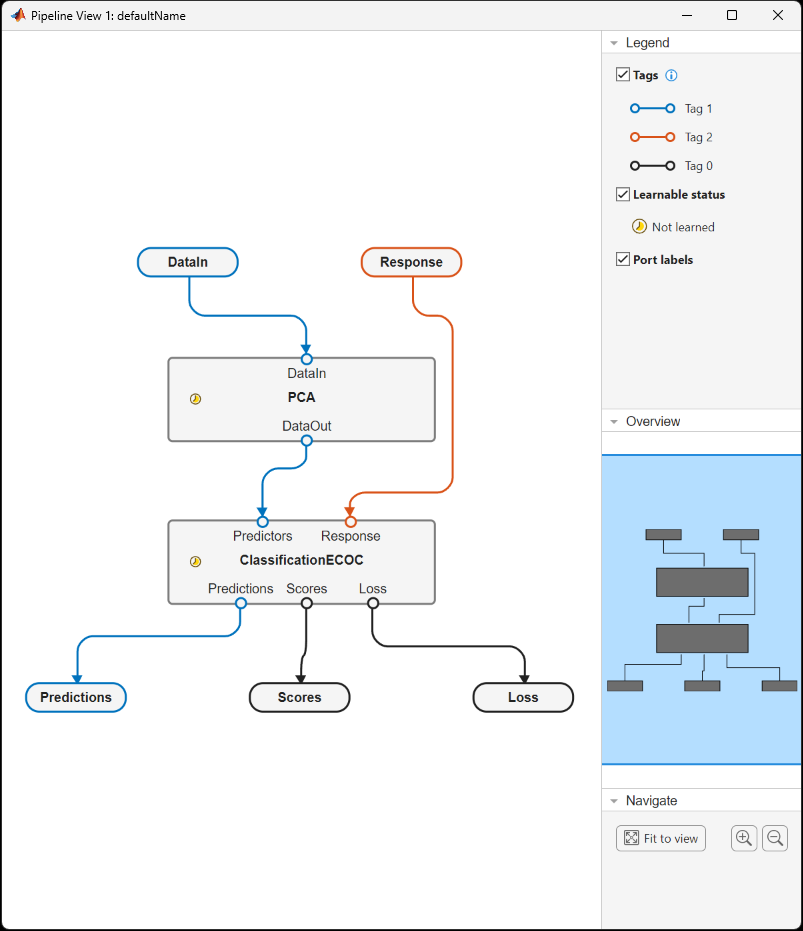
The pipeline has two components with learnable parameters, neither of which has been
learned yet. This pipeline has no components without learnable parameters. The display
also shows the inputs and outputs of the pipeline and the internal data ports, such as
DataOut from the PCA component.
Load sample data and define the predictor and response variables.
fisheriris = readtable("fisheriris.csv");
X = fisheriris(:,1:end-1);
Y = fisheriris(:,end);Learn the pipeline by passing data through it. View the learned pipeline.
[learnedPipeline,predY,scores,loss] = learn(pipeline,X,Y); view(learnedPipeline)
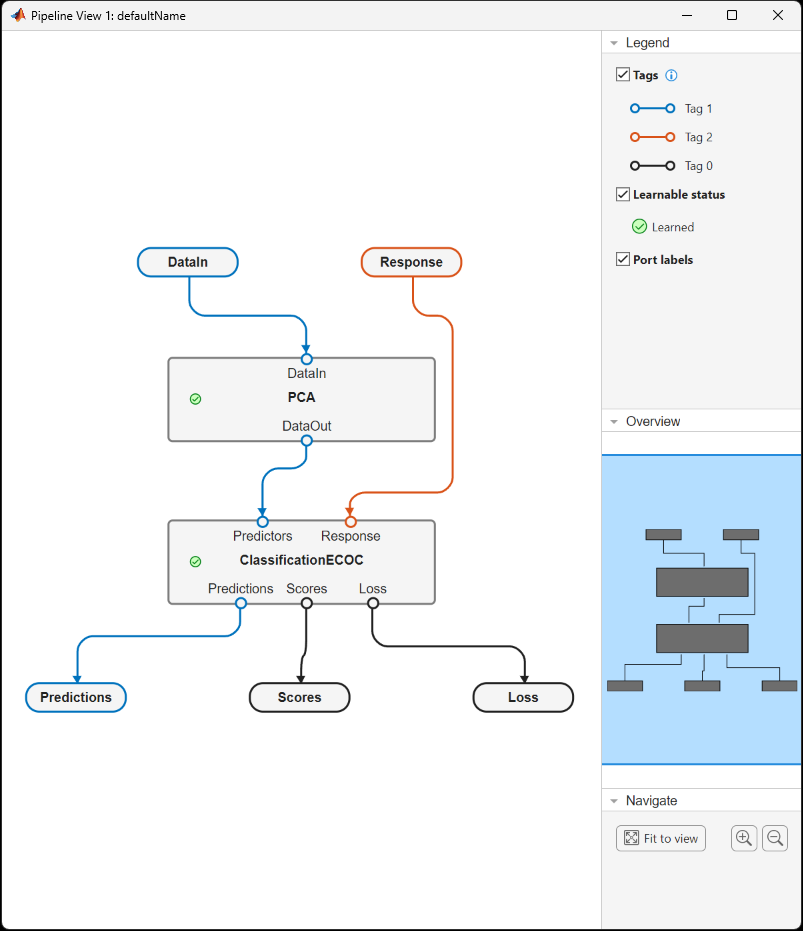
Note that the parameters in the two components have been learned. To see the learned
parameters, index into the components, for example,
learnedPipeline.Components.PCA.
For a more in-depth example that uses pipeline visualizations, see Create Simple Classification Pipeline.
Input Arguments
Pipeline or component to view, specified as a LearningPipeline object or a learning component object in one of the
following tables.
Data Preprocessing Components
| Component | Purpose |
|---|---|
equalWidthBinnerComponent | Grouping data into equal-width bins |
frequencyEncoderComponent | Frequency encoding categorical variables |
kmeansEncoderComponent | Feature extraction using k-means clustering |
normalizerComponent | Normalizing data |
observationImputerComponent | Imputing missing values |
observationRemoverComponent | Removing observations |
oneHotEncoderComponent | Encoding categorical data into one-hot vectors |
outlierImputerComponent | Imputing outlier values |
outlierRemoverComponent | Removing outlier values |
pcaComponent | Principal component analysis (PCA) |
quantileBinnerComponent | Binning data into equally probable bins |
ricaComponent | Feature extraction using reconstruction independent component analysis (RICA) |
sparseFilterComponent | Feature extraction using sparse filtering |
Feature Selection and Engineering Components
| Component | Purpose |
|---|---|
featureSelectionClassificationANOVAComponent | Feature selection using one-way ANOVA test |
featureSelectionClassificationChi2Component | Feature selection using chi-square tests |
featureSelectionClassificationKruskalWallisComponent | Feature selection using Kruskal-Wallis test |
featureSelectionClassificationMRMRComponent | Minimum redundancy maximum relevance (MRMR) feature selection in classification workflow |
featureSelectionClassificationNCAComponent | Neighborhood component analysis (NCA) feature selection in classification workflow |
featureSelectionClassificationReliefFComponent | ReliefF feature selection in classification workflow |
featureSelectionRegressionFTestComponent | Feature selection using F-tests |
featureSelectionRegressionMRMRComponent | Minimum redundancy maximum relevance (MRMR) feature selection in regression workflow |
featureSelectionRegressionNCAComponent | Neighborhood component analysis (NCA) feature selection in regression workflow |
featureSelectionRegressionReliefFComponent | ReliefF feature selection in regression workflow |
variableSelectorComponent | Manual variable selection |
Classification Model Components
| Component | Purpose |
|---|---|
classificationDiscriminantComponent | Discriminant analysis classification |
classificationECOCComponent | Multiclass classification using error-correcting output codes (ECOC) model |
classificationEnsembleComponent | Ensemble classification |
classificationGAMComponent | Binary classification using generalized additive model (GAM) |
classificationKernelComponent | Classification using Gaussian kernel with random feature expansion |
classificationKNNComponent | Classification using k-nearest neighbor model |
classificationLinearComponent | Binary classification of high-dimensional data using a linear model |
classificationNaiveBayesComponent | Multiclass classification using a naive Bayes model |
classificationNeuralNetworkComponent | Classification using a neural network model |
classificationSVMComponent | One-class and binary classification using a support vector machine (SVM) classifier |
classificationTreeComponent | Decision tree classifier |
Regression Model Components
| Component | Purpose |
|---|---|
regressionEnsembleComponent | Ensemble regression |
regressionGAMComponent | Regression using generalized additive model (GAM) |
regressionGPComponent | Gaussian process regression |
regressionKernelComponent | Kernel regression using explicit feature expansion |
regressionLinearComponent | Linear regression |
regressionNeuralNetworkComponent | Neural network regression |
regressionSVMComponent | Regression using a support vector machine (SVM) |
regressionTreeComponent | Decision tree regression |
Custom Components
| Component | Purpose |
|---|---|
functionComponent | Custom function |
Version History
Introduced in R2026a
See Also
MATLAB Command
You clicked a link that corresponds to this MATLAB command:
Run the command by entering it in the MATLAB Command Window. Web browsers do not support MATLAB commands.
Sélectionner un site web
Choisissez un site web pour accéder au contenu traduit dans votre langue (lorsqu'il est disponible) et voir les événements et les offres locales. D’après votre position, nous vous recommandons de sélectionner la région suivante : .
Vous pouvez également sélectionner un site web dans la liste suivante :
Comment optimiser les performances du site
Pour optimiser les performances du site, sélectionnez la région Chine (en chinois ou en anglais). Les sites de MathWorks pour les autres pays ne sont pas optimisés pour les visites provenant de votre région.
Amériques
- América Latina (Español)
- Canada (English)
- United States (English)
Europe
- Belgium (English)
- Denmark (English)
- Deutschland (Deutsch)
- España (Español)
- Finland (English)
- France (Français)
- Ireland (English)
- Italia (Italiano)
- Luxembourg (English)
- Netherlands (English)
- Norway (English)
- Österreich (Deutsch)
- Portugal (English)
- Sweden (English)
- Switzerland
- United Kingdom (English)