diric
Dirichlet or periodic sinc function
Syntax
Description
returns the Dirichlet Function of degree
y = diric(x,n)n evaluated at the elements of the input array
x.
Examples
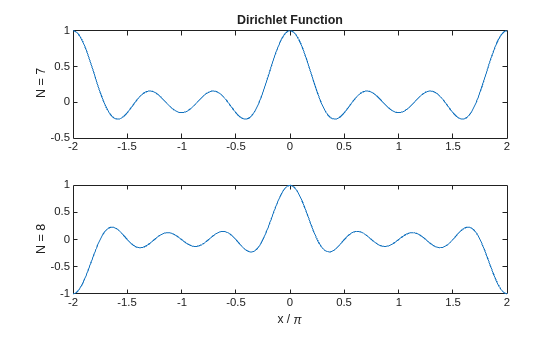
Compute and plot the Dirichlet function between and for N = 7 and N = 8. The function has a period of for odd N and for even N.
x = linspace(-2*pi,2*pi,301); d7 = diric(x,7); d8 = diric(x,8); subplot(2,1,1) plot(x/pi,d7) ylabel('N = 7') title('Dirichlet Function') subplot(2,1,2) plot(x/pi,d8) ylabel('N = 8') xlabel('x / \pi')

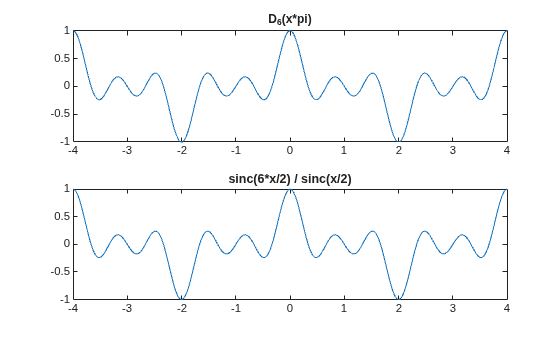
The Dirichlet and sinc functions are related by . Show this relationship for . Avoid indeterminate expressions by specifying that the ratio of sinc functions is for , where is an integer.
xmax = 4; x = linspace(-xmax,xmax,1001)'; N = 6; yd = diric(x*pi,N); ys = sinc(N*x/2)./sinc(x/2); ys(~mod(x,2)) = (-1).^(x(~mod(x,2))/2*(N-1)); subplot(2,1,1) plot(x,yd) title('D_6(x*pi)') subplot(2,1,2) plot(x,ys) title('sinc(6*x/2) / sinc(x/2)')

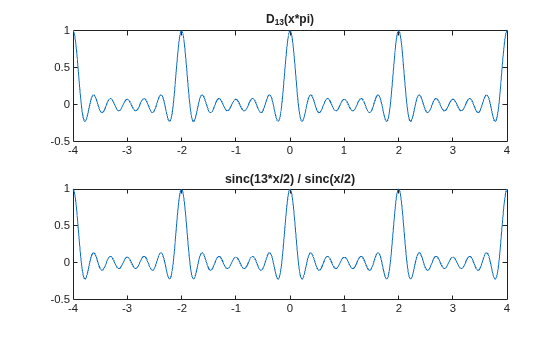
Repeat the calculation for .
N = 13; yd = diric(x*pi,N); ys = sinc(N*x/2)./sinc(x/2); ys(~mod(x,2)) = (-1).^(x(~mod(x,2))/2*(N-1)); subplot(2,1,1) plot(x,yd) title('D_{13}(x*pi)') subplot(2,1,2) plot(x,ys) title('sinc(13*x/2) / sinc(x/2)')

Input Arguments
Input array, specified as a real scalar, vector, matrix, or N-D
array. When x is nonscalar, diric is an
element-wise operation.
Data Types: double | single
Function degree, specified as a positive integer scalar.
Data Types: double | single
Output Arguments
Output array, returned as a real-valued scalar, vector, matrix, or
N-D array of the same size as x.
More About
The Dirichlet function, or periodic sinc function, is
for any nonzero integer N.
This function has period 2π for odd N and period 4π for even N. Its maximum value is 1 for all N, and its minimum value is –1 for even N. The magnitude of the function is 1/N times the magnitude of the discrete-time Fourier transform of the N-point rectangular window.
Extended Capabilities
C/C++ Code Generation
Generate C and C++ code using MATLAB® Coder™.
GPU Code Generation
Generate CUDA® code for NVIDIA® GPUs using GPU Coder™.
Version History
Introduced before R2006a
MATLAB Command
You clicked a link that corresponds to this MATLAB command:
Run the command by entering it in the MATLAB Command Window. Web browsers do not support MATLAB commands.
Sélectionner un site web
Choisissez un site web pour accéder au contenu traduit dans votre langue (lorsqu'il est disponible) et voir les événements et les offres locales. D’après votre position, nous vous recommandons de sélectionner la région suivante : .
Vous pouvez également sélectionner un site web dans la liste suivante :
Comment optimiser les performances du site
Pour optimiser les performances du site, sélectionnez la région Chine (en chinois ou en anglais). Les sites de MathWorks pour les autres pays ne sont pas optimisés pour les visites provenant de votre région.
Amériques
- América Latina (Español)
- Canada (English)
- United States (English)
Europe
- Belgium (English)
- Denmark (English)
- Deutschland (Deutsch)
- España (Español)
- Finland (English)
- France (Français)
- Ireland (English)
- Italia (Italiano)
- Luxembourg (English)
- Netherlands (English)
- Norway (English)
- Österreich (Deutsch)
- Portugal (English)
- Sweden (English)
- Switzerland
- United Kingdom (English)