La traduction de cette page n'est pas à jour. Cliquez ici pour voir la dernière version en anglais.
Lookup tables
R2026aUtilisez les blocs de la bibliothèque Lookup Tables pour modéliser la non-linéarité. Les blocs Lookup Table utilisent des tableaux de données pour mapper des valeurs d'entrée sur des valeurs de sortie et ainsi approximer des fonctions mathématiques. Pour approximer une fonction de N variables, utilisez le bloc n-D Lookup Table :
Pour gérer les lookup tables de votre environnement, vous pouvez envisager d'utiliser Lookup Table Editor. Regardez la vidéo How to Use the Lookup Table Editor (5 min 9 s).
Blocs
 | 1-D Lookup Table | Approximate one-dimensional function |
 | 2-D Lookup Table | Approximate two-dimensional function |
 | Direct Lookup Table (n-D) | Index into n-dimensional table to retrieve element, vector, or 2-D matrix |
 | Interpolation Using Prelookup | Use precalculated index and fraction values to accelerate approximation of N-dimensional function |
 | Lookup Table Dynamic | (Not recommended) Approximate a one-dimensional function using dynamic table |
 | Prelookup | Compute index and fraction for Interpolation Using Prelookup block |
 | Sine | Implement fixed-point sine or cosine wave using lookup table approach that exploits quarter wave symmetry |
 | n-D Lookup Table | Approximate n-dimensional function |
Outils
| Lookup Table Editor | Create, edit, and manage lookup tables in models (depuis R2022a) |
Rubriques
Travailler avec des lookup tables
- Edit and Visualize Lookup Table Data
View, add, delete, or update lookup table data. - Enter Breakpoints and Table Data
Specify breakpoint vectors and table data for a lookup table. - Import Data to Lookup Table
Import table and breakpoint data from MATLAB® workspace and Excel® spreadsheets. - Visualize Lookup Table Data Using Lookup Table Control
Visualize lookup table data. - Configure Lookup Table Block for Logarithmic Operation
Configure an n-D Lookup Table block for logarithmic operation with the common logarithmic base (base 10). - Optimize Generated Code for Lookup Table Blocks
Optimize code for Lookup Table blocks. - Use Row-Major Algorithms for Lookup Table Blocks
Use row-major algorithms for C/C++ code generation from models containing Lookup Table blocks.
À propos des lookup tables
- Specify Breakpoint and Table Data with Variable Size and Symbolic Dimensions
Specify breakpoint and table data that changes size during model simulation or represented by symbolic dimensions. - Choose Lookup Table Blocks Based on Input, Breakpoint and Output Data
Select the Lookup Table block best suited for your application. - Common Uses of Prelookup and Interpolation Using Prelookup Blocks
Common use cases of the Prelookup and Interpolation Using Prelookup blocks. - Choose Numerical Methods to Approximate Function Values
Set the method by which Lookup Table blocks approximate function values.
Mettre à jour les lookup tables d'une version précédente
- Update Lookup Table Blocks to New Versions
Update existing models to use current versions of lookup table blocks.
Sélection d՚exemples
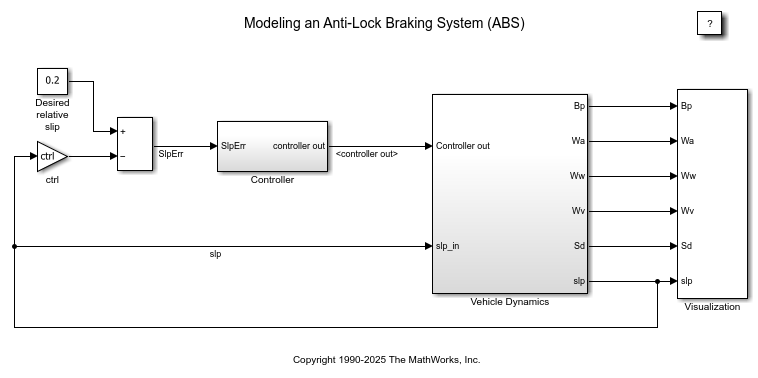
Modéliser un système antiblocage des roues
Cet exemple montre comment modéliser un système antiblocage des roues (ABS) simple. Le modèle simule le comportement dynamique d’un véhicule en conditions de freinage brutal. Il représente une seule roue qui peut être répliquée plusieurs fois pour créer le modèle d’un véhicule à plusieurs roues.
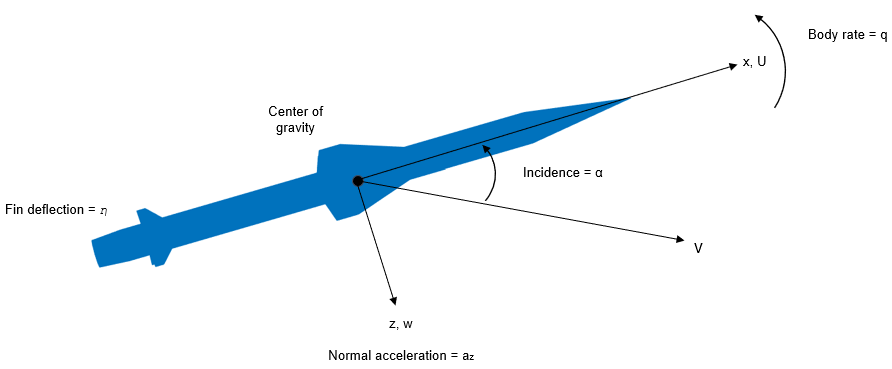
Design a Guidance System in MATLAB and Simulink
Use the model of the missile airframe presented in a number of published papers on the use of advanced control methods applied to missile autopilot design. See [1], [2], and [3]. The model represents a tail-controlled missile traveling between Mach 2 and Mach 4, at altitudes ranging between 10,000 ft (3,050 m) and 60,000 ft (18,290 m), with typical angles of attack ranging between +/- 20 degrees.
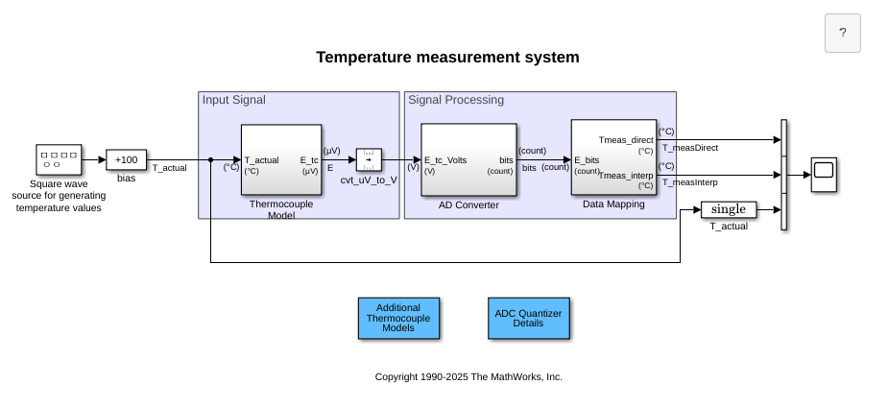
Temperature Measurement System Using Nonlinear Behavioral Data of Type S Thermocouple
Build and simulate a temperature measurement system that uses a nonlinear dataset describing the behavior of a type S thermocouple.
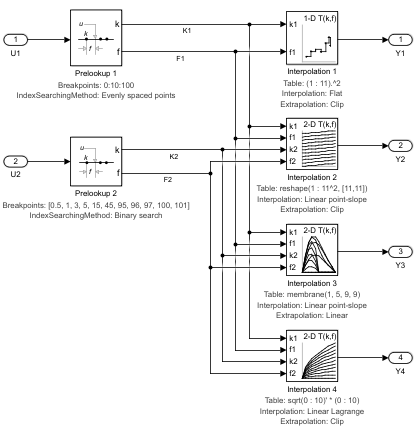
Using the Prelookup and Interpolation Using Prelookup Blocks
Use the Prelookup and Interpolation Using Prelookup blocks.
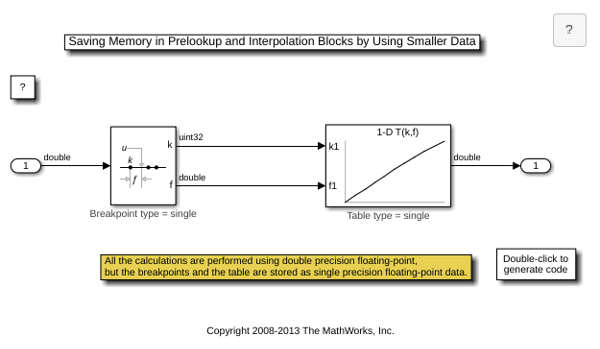
Saving Memory in Prelookup and Interpolation Using Prelookup Blocks by Using Smaller Data
Save memory in Prelookup and Interpolation Using Prelookup blocks. The Prelookup and Interpolation Using Prelookup blocks allow you to explicitly set data type for storing breakpoints and table data, respectively. The Prelookup block allows the breakpoint data to differ from the input data type, and the Interpolation Using Prelookup block allows the table data to differ from the output data type.

