Weighted Sample Time
R2026bSupport calculations involving sample time
Weighted Sample Time block

To add a block to a model, double-click the canvas and start typing the block name. Then, select the block from the list.
Libraries:
Simulink /
Signal Attributes
Description
The Weighted Sample Time block outputs a weighted sample time, weighted sample rate, or mathematically adjusted weighted sample time, depending on settings of the Operation and Weight value parameters and the execution context of the function outputs.
You specify the block operation by using the Operation parameter.
The sample time used to derive the output depends on whether the block is used within a periodic or aperiodic (or triggered) execution context. For a periodic execution context, the block uses the sample time of the model. For an aperiodic or triggered execution context, the block uses the sample time of the discrete signal.
Use the Weight value parameter to specify the sample time weight
factor. If the weight value, w, is 1, that value does
not appear in the equation on the block icon.
Tip
You can use the
Weighted Sample Time and Weighted Sample Time Math
blocks to extract the sample time from a Simulink® signal. Set the Operation parameter to
Ts Only and the Weight value
parameter to 1.0. With this configuration, the block outputs the
sample time of the input signal.
The block computes its output by using the precedence rules for MATLAB® operators. For example, if the Operation parameter is set
to +, the block calculates the output by using this expression:
u + (Ts * w)
If the Operation parameter is set to /, the block
calculates the output by using this expression:
(u / (Ts * w))
For more information, see Operator Precedence.
Examples
This example shows how to add the sample time value to a signal using the Weighted Sample Time Math block.
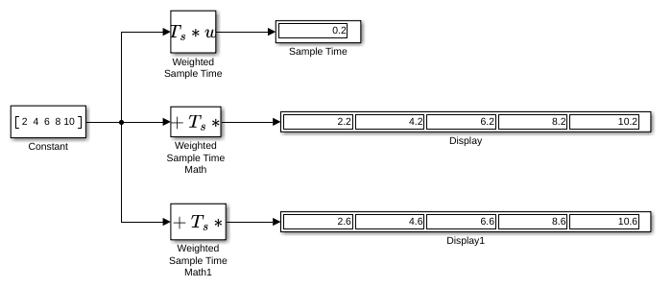
Using the Weighted Sample Time block, you can see the sample time of this model is 0.2. When you set the Operation parameter to + and the Weight value to 1 on the Weighted Sample Time Math block, the block adds the sample time value of 0.2 to the input signal. When you set the Weight value to 3 in the Weighted Sample Time Math1 block, the block adds Ts*3 to the input signal, thus increasing each value by 0.6.
Ports
Input
Output
Parameters
Block Characteristics
Data Types |
|
Direct Feedthrough |
|
Multidimensional Signals |
|
Variable-Size Signals |
|
Zero-Crossing Detection |
|
Programmatic Use: Add Block
To add the block programmatically, use the add_block function with one of these library block paths as the source.
"simulink/Signal Attributes/Weighted Sample Time"
Example: add_block("simulink/Signal Attributes/Weighted Sample Time","myModel/myBlock",MakeNameUnique="on")

