tqwt
R2026bTunable Q-factor wavelet transform
Description
returns the
tunable Q-factor wavelet transform (TQWT) of wt = tqwt(x)x.
The TQWT is computed to the maximum decomposition level with a quality factor of 1. For more information, see TQWT Decomposition Levels.
As implemented, the
tqwtfunction uses a redundancy of 3. For more information, see Redundancy.
specifies one or more additional name-value arguments. For example, wt = tqwt(x,Name=Value)wt =
tqwt(x,QualityFactor=2) specifies a quality factor of 2.
Examples
Load a multichannel EEG signal. The signal has 23 channels.
load Espiga3
size(Espiga3,2)ans = 23
Obtain the tunable Q-factor wavelet transform of the multisignal to the maximum level using the default quality factor of 1.
wt = tqwt(Espiga3); numel(wt)
ans = 12
For 1 ≤ i ≤ numel(wt)-1, the ith element of wt contains the wavelet transform coefficients for the ith subband. The last element of wt contains the lowpass subband coefficients. Confirm the number of columns of any element of wt is equal to the number of channels.
k = 7;
size(wt{k},2)ans = 23
Reconstruct the multisignal and demonstrate perfect reconstruction.
xrec = itqwt(wt,size(Espiga3,1)); max(abs(xrec(:)-Espiga3(:)))
ans = 5.1159e-13
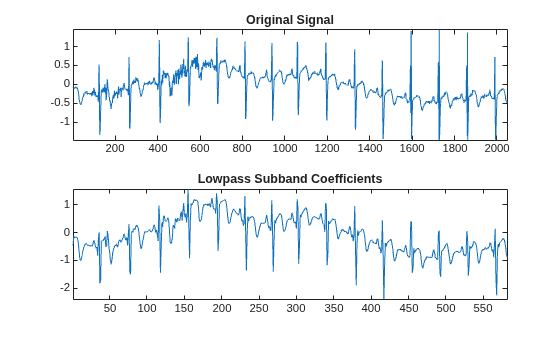
Load an ECG signal. Obtain the TQWT of the signal down to level 5 with a quality factor of 2. Also obtain information of the TQWT.
load wecg
lvl = 5;
qf = 2;
[wt,info] = tqwt(wecg,Level=lvl,QualityFactor=qf);Plot the original signal and compare with the lowpass subband coefficients.
subplot(2,1,1) plot(wecg) title("Original Signal") axis tight subplot(2,1,2) plot(wt{end}) title("Lowpass Subband Coefficients") axis tight
Inspect the TQWT information structure. For each subband, confirm that the ratio of the center frequency to the approximate bandwidth equals the quality factor.
info
info = struct with fields:
CenterFrequencies: [0.3333 0.2593 0.2016 0.1568 0.1220]
Bandwidths: [0.1667 0.1296 0.1008 0.0784 0.0610]
Level: 5
Alpha: 0.7778
Beta: 0.6667
info.CenterFrequencies./info.Bandwidths
ans = 1×5
2.0000 2.0000 2.0000 2.0000 2.0000
As implemented, the tqwt function uses the redundancy . Confirm the highpass and lowpass scaling factors, info.Beta and info.Alpha respectively, satisfy the relation .
info.Beta/(1-info.Alpha)
ans = 3
Input Arguments
Input signal, specified as a single- or double-precision vector, matrix, or 3-D
array. If x is a matrix or 3-D array, the TQWT is computed along
the columns of x. For 3-D arrays, tqwt
interprets the first dimension as time, the second dimension as channels, and the third
dimension as a batch.
The TQWT is defined for even-length signals. If the number of samples in
x is odd, the last sample of x is repeated
to obtain an even-length signal.
Data Types: single | double
Complex Number Support: Yes
Name-Value Arguments
Specify optional pairs of arguments as
Name1=Value1,...,NameN=ValueN, where Name is
the argument name and Value is the corresponding value.
Name-value arguments must appear after other arguments, but the order of the
pairs does not matter.
Example: wt = tqwt(x,Level=3,QualityFactor=2)
Decomposition level of the TQWT, specified as a positive integer between 1 and the maximum level. The maximum level depends on the signal length and quality factor. For more information, see TQWT Decomposition Levels.
Example: wt = tqwt(x,Level=3) specifies a decomposition level of
3.
Data Types: single | double
Quality factor, specified as a real-valued scalar greater than or equal to 1. The quality factor is the ratio of the center frequency to the bandwidth of the filters. If unspecified, the quality factor defaults to 1.
Example: wt = tqwt(x,QualityFactor=1.5) specifies a quality
factor of 1.5.
Data Types: single | double
Output Arguments
Tunable Q-factor wavelet transform, returned as a cell array.
wt is a cell array with length equal to the maximum level of the
TQWT plus one. The ith element of wt contains
the TQWT coefficients for the ith subband. The subbands are ordered
by decreasing center frequency. The final element of wt contains
the lowpass subband coefficients. The wavelet coefficients in wt
match x in data type and complexity.
If
xis a row vector, each element ofwtis a column vector containing the TQWT coefficients.If
xis a matrix or 3-D array, the column and page sizes of each element ofwtmatch the column and page sizes ofx.
Data Types: single | double
Transform information, returned as a structure array. info has
five fields:
CenterFrequencies— The normalized center frequencies (cycles/sample) of the wavelet subbands in the TQWT ofx. To convert the frequencies to hertz, multiplyCenterFrequenciesby the sample rate.Bandwidths— The approximate bandwidths of the wavelet subbands in normalized frequency (cycles/sample). To convert the bandwidths to hertz, multiplyBandwidthsby the sample rate.Level— Level of the TQWT. Note thatinfo.Levelmay be different from your specified level if you specify a level greater than the maximum supported level for your signal length and quality factor.Beta— Highpass scaling factor. The highpass scaling factor is computed from the quality factor as2/(. Accordingly,QualityFactor+1)0 < Beta ≤ 1.Alpha— Lowpass scaling factor. The lowpass scaling factor is computed from the highpass scaling factor as1-Beta/3. Accordingly,2/3 ≤ Alpha < 1.
Data Types: struct
More About
The TQWT minimum and maximum decomposition levels depend on the signal length, N, and quality factor, Q. In the description that follows, the signal length, N, is one sample larger than the input length for odd-length signals.
The maximum decomposition level is
where the ⌊ ⌋ symbols denote the floor function.
The minimum level also depends on the signal length and quality factor. The logarithm of N, must satisfy the following inequality:
If the maximum level is less than 1 and tqwt throws an
error.
The TQWT algorithm depends on scaling in the frequency domain:
lowpass scaling — frequency-domain scaling by α that preserves low-frequency content
highpass scaling — frequency-domain scaling by β that preserves high-frequency content
The redundancy is defined to be
For more information, see Tunable Q-factor Wavelet Transform.
References
[1] Selesnick, Ivan W. “Wavelet Transform With Tunable Q-Factor.” IEEE Transactions on Signal Processing 59, no. 8 (August 2011): 3560–75. https://doi.org/10.1109/TSP.2011.2143711.
Extended Capabilities
C/C++ Code Generation
Generate C and C++ code using MATLAB® Coder™.
GPU Code Generation
Generate CUDA® code for NVIDIA® GPUs using GPU Coder™.
The tqwt
function fully supports thread-based environments. For more information, see Run MATLAB Functions in Thread-Based Environment.
The tqwt function
supports GPU array input with these usage notes and limitations:
The signal
xis the only supported input argument.The TQWT array
wtis the only supported output argument.
For more information, see Run MATLAB Functions on a GPU (Parallel Computing Toolbox).
Version History
Introduced in R2021bYou can use tqwt in thread-based
environments. For more information, see Run MATLAB Functions in Thread-Based Environment.
See Also
Apps
Functions
MATLAB Command
You clicked a link that corresponds to this MATLAB command:
Run the command by entering it in the MATLAB Command Window. Web browsers do not support MATLAB commands.
Sélectionner un site web
Choisissez un site web pour accéder au contenu traduit dans votre langue (lorsqu'il est disponible) et voir les événements et les offres locales. D’après votre position, nous vous recommandons de sélectionner la région suivante : .
Vous pouvez également sélectionner un site web dans la liste suivante :
Comment optimiser les performances du site
Pour optimiser les performances du site, sélectionnez la région Chine (en chinois ou en anglais). Les sites de MathWorks pour les autres pays ne sont pas optimisés pour les visites provenant de votre région.
Amériques
- América Latina (Español)
- Canada (English)
- United States (English)
Europe
- Belgium (English)
- Denmark (English)
- Deutschland (Deutsch)
- España (Español)
- Finland (English)
- France (Français)
- Ireland (English)
- Italia (Italiano)
- Luxembourg (English)
- Netherlands (English)
- Norway (English)
- Österreich (Deutsch)
- Portugal (English)
- Sweden (English)
- Switzerland
- United Kingdom (English)