La traduction de cette page n'est pas à jour. Cliquez ici pour voir la dernière version en anglais.
Enregistrer les résultats de simulation et d'analyse
R2026aEnregistrez les données de simulation et les résultats d'analyse pour référence ultérieure ou pour les partager avec vos collègues.
Outils
Fonctions
Objets
matlab.io.datastore.MLDATXSignalDatastore | Datastore for data saved in MLDATX file (depuis R2026a) |
mldatx.io.File | Reference to runs in MLDATX file (depuis R2026a) |
mldatx.io.Signal | Reference to signal in MLDATX file (depuis R2026a) |
Rubriques
- Microsoft Excel Import, Export, and Logging Format
Understand the Microsoft® Excel® file format used by the Simulation Data Inspector, the Record block, and Simulink® Test™.
- Save and Share Simulation Data Inspector Data and Views
Share exported data, Simulation Data Inspector sessions and views, and plot images and figures.
- Export Data From Simulation Data Inspector to Workspace or File
Export a selection of runs and signals from the Simulation Data Inspector to the workspace or a MAT, Microsoft Excel, Parquet, CSV, or VCD file.
- Create Interactive Comparison Reports
Save and share Simulation Data Inspector comparison results in an interactive web report.
- Incrementally Read Data Too Large to Fit into Memory from MLDATX File to Workspace
Read data that is too large to fit into memory from an MLDATX file into the workspace incrementally.
- Export Data from Simulation Data Inspector to Parquet File
Interactively or programmatically export big data from Simulation Data Inspector to a Parquet file. (depuis R2026a)
- Parquet File Format for Simulation Data
Format used when importing and exporting simulation data as Parquet files. (depuis R2026a)
Sélection d՚exemples
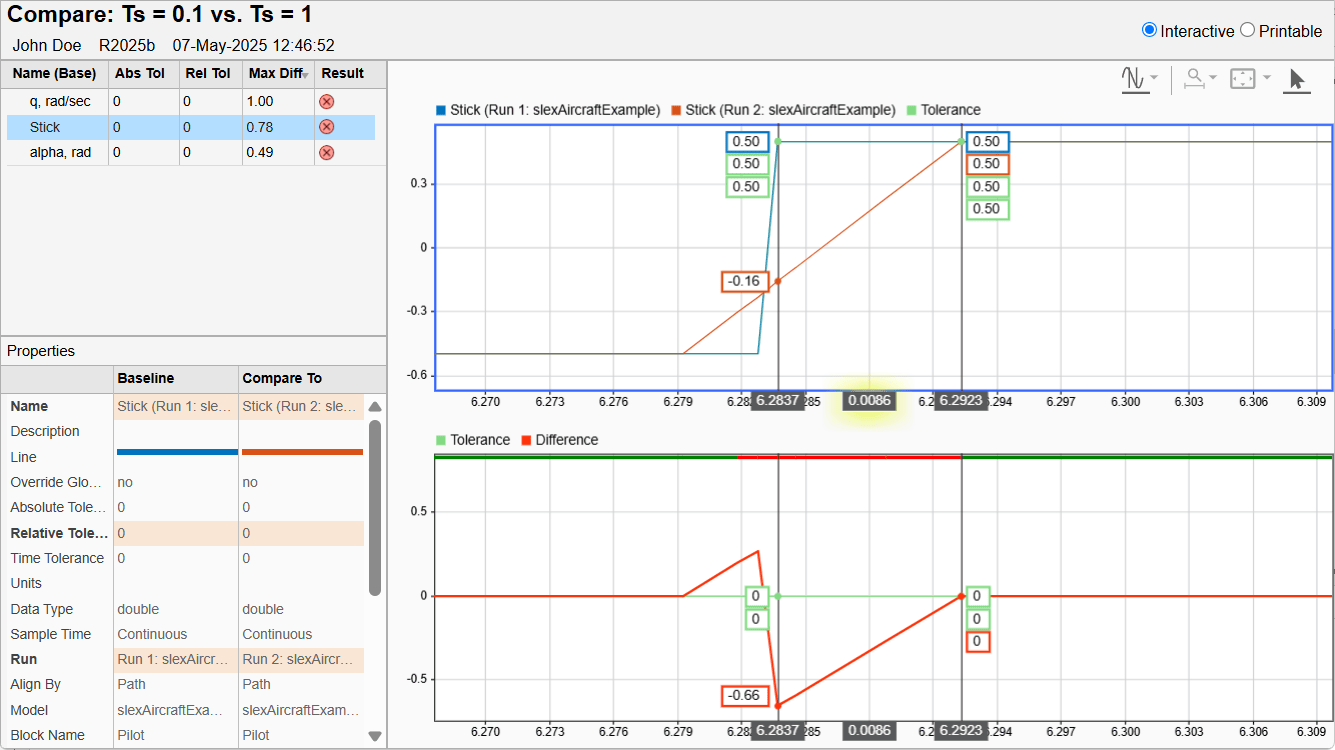
Create Interactive Comparison Reports
Save and share Simulation Data Inspector comparison results in an interactive web report.

