periodogram
R2026bPeriodogram power spectral density estimate
Syntax
Description
[
returns the periodogram PSD estimate of the signal pxx,f] = periodogram(x,win,freqSpec)x and
the frequencies f (rad/sample), where the
periodogram function:
Uses
winto divide the signal into segments and windows them.Computes the discrete Fourier transform (DFT) over the number of DFT points or at the frequencies specified in
freqSpec.
To use default values for any of these input arguments, specify
them as empty, [].
[
also specifies the frequency range and spectrum type for any of the previous
syntaxes. You can specify either or both of these input arguments.pxx,f] = periodogram(___,freqRange,spectrumType)
[
reassigns each PSD estimate or power spectrum estimate to the location of its
center of energy. The vector rpxx,f,pxx,fc] = periodogram(___,"reassigned")rpxx contains the sum of the
estimates reassigned to each element of f. This syntax also
returns the center-of-energy frequencies, fc.
If your signal contains well-localized spectral components, then the
"reassigned" argument generates a sharper
periodogram.
periodogram(___) with no output arguments
plots the periodogram PSD estimate or power spectrum in the current figure
window.
Examples
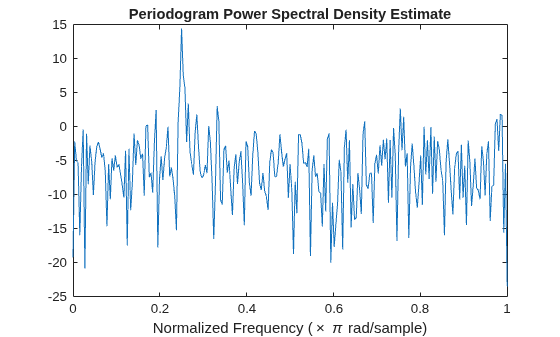
Obtain the periodogram of an input signal consisting of a discrete-time sinusoid with an angular frequency of rad/sample with additive white noise.
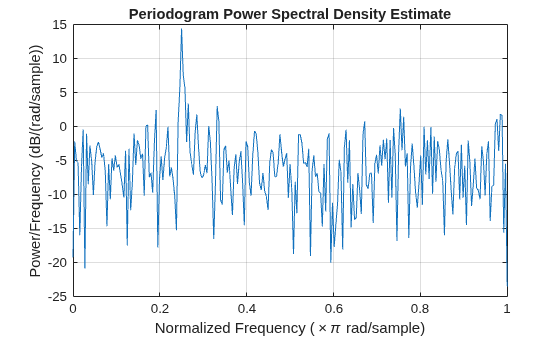
Create a sine wave with an angular frequency of rad/sample with additive white noise. The signal is 320 samples in length. Obtain the periodogram using the default rectangular window and DFT length. The DFT length is the next power of two greater than the signal length, or 512 points. Because the signal is real-valued and has even length, the periodogram is one-sided and there are 512/2+1 points.
n = 0:319;
x = cos(pi/4*n) + randn(size(n));
[pxx,w] = periodogram(x);
plot(w/pi,pow2db(pxx))
xlabel("Normalized Frequency (\times \pi rad/sample)")
title("Periodogram Power Spectral Density Estimate")
Repeat the plot using periodogram with no outputs.
periodogram(x)
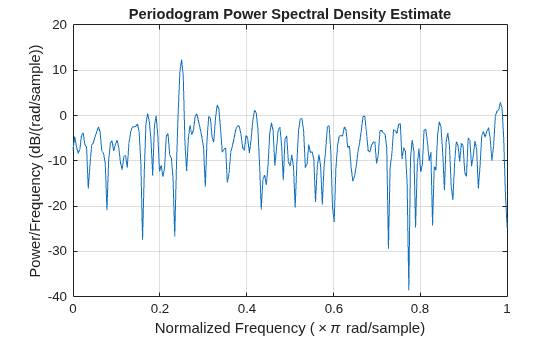
Obtain the modified periodogram of an input signal consisting of a discrete-time sinusoid with an angular frequency of radians/sample with additive white noise.
Create a sine wave with an angular frequency of radians/sample with additive white noise. The signal is 320 samples in length. Obtain the modified periodogram using a Hamming window and default DFT length. The DFT length is the next power of two greater than the signal length, or 512 points. Because the signal is real-valued and has even length, the periodogram is one-sided and there are 512/2+1 points.
n = 0:319;
x = cos(pi/4*n) + randn(size(n));
periodogram(x,hamming(length(x)))
Obtain the periodogram of an input signal consisting of a discrete-time sinusoid with an angular frequency of radians/sample with additive white noise. Use a DFT length equal to the signal length.
Create a sine wave with an angular frequency of radians/sample with additive white noise. The signal is 320 samples in length. Obtain the periodogram using the default rectangular window and DFT length equal to the signal length. Because the signal is real-valued, the one-sided periodogram is returned by default with a length equal to 320/2+1.
rng("default")
n = 0:319;
x = cos(pi/4*n) + randn(size(n));
nfft = length(x);
periodogram(x,[],nfft)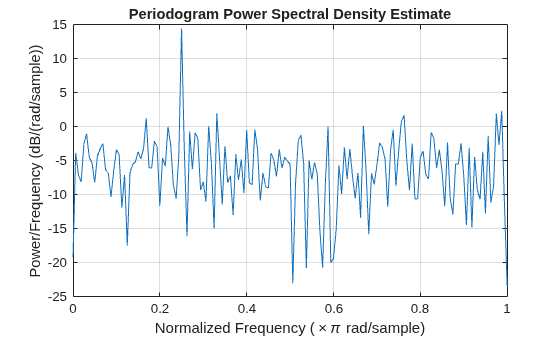
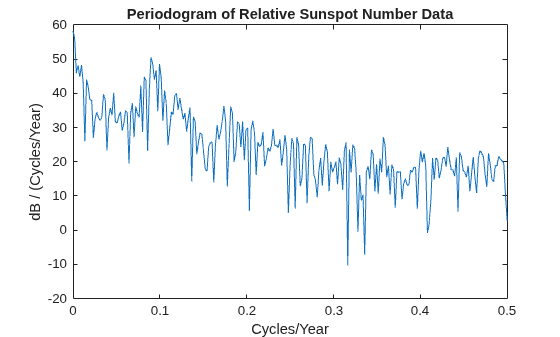
Obtain the periodogram of the Wolf (relative sunspot) number data sampled yearly between 1700 and 1987.
Load the relative sunspot number data. Obtain the periodogram using the default rectangular window and number of DFT points (512 in this example). The sample rate for these data is 1 sample/year.
load sunspot.dat
relNums=sunspot(:,2);

[pxx,f] = periodogram(relNums,[],[],1);
Plot the periodogram. There is a peak in the periodogram at approximately 0.1 cycles/year, which indicates a period of approximately 10 years.
plot(f,pow2db(pxx))
xlabel("Cycles/Year")
ylabel("dB / (Cycles/Year)")
title("Periodogram of Relative Sunspot Number Data")
Obtain the periodogram of an input signal consisting of two discrete-time sinusoids with an angular frequencies of and rad/sample in additive white noise. Obtain the two-sided periodogram estimates at and rad/sample.
n = 0:319;
x = cos(pi/4*n) + 0.5*sin(pi/2*n) + randn(size(n));

[pxx,w] = periodogram(x,[],[pi/4 pi/2]);
pxx
pxx = 1×2

   14.0589    2.8872
[pxx1,w1] = periodogram(x);
Compare the result to the one-sided periodogram. The periodogram values obtained are 1/2 the values in the one-sided periodogram. When you evaluate the periodogram at a specific set of frequencies, the output is a two-sided estimate.
plot(w1/pi,pxx1,w/pi,2*pxx,"o")
legend("pxx1","2*pxx")
xlabel("Normalized Frequency (\times \pi rad/sample)")
title("Periodogram Power Spectral Density Estimate")

Create a signal consisting of two sine waves with frequencies of 100 and 200 Hz in N(0,1) white additive noise. The sample rate is 1 kHz. Obtain the two-sided periodogram at 100 and 200 Hz.
rng("default")
Fs = 1000;
t = 0:0.001:1-0.001;
x = cos(2*pi*100*t) + sin(2*pi*200*t) + randn(size(t));

freq = [100 200];
pxx = periodogram(x,[],freq,Fs)
pxx = 1×2
0.2647 0.2313
This example illustrates the use of confidence bounds with the periodogram. While not a necessary condition for statistical significance, frequencies in the periodogram where the lower confidence bound exceeds the upper confidence bound for surrounding PSD estimates clearly indicate significant oscillations in the time series.
Create a signal consisting of the superposition of 100 Hz and 150 Hz sine waves in additive white N(0,1) noise. The amplitude of the two sine waves is 1. The sample rate is 1 kHz.
rng("default")
Fs = 1000;
t = 0:1/Fs:1-1/Fs;
x = cos(2*pi*100*t) + sin(2*pi*150*t) + randn(size(t));
Obtain the periodogram PSD estimate with 95%-confidence bounds.
L = length(x);
[pxx,f,pxxc] = periodogram(x,rectwin(L),L,Fs,ConfidenceLevel=0.95);
Plot the periodogram along with the confidence interval and zoom in on the frequency region of interest near 100 and 150 Hz. The lower confidence bound in the immediate vicinity of 100 and 150 Hz is significantly above the upper confidence bound outside the vicinity of 100 and 150 Hz.
plot(f,pow2db(pxx))
hold on
plot(f,pow2db(pxxc),"-.",Color=[0.866 0.329 0])

xlim([85 175])
xlabel("Hz")
ylabel("dB/Hz")
title("Periodogram with 95%-Confidence Bounds")

Obtain the periodogram of a 100 Hz sine wave in additive noise. The sample rate is 1 kHz. Use the "centered" option to obtain the DC-centered periodogram and plot the result.
fs = 1000;
t = 0:0.001:1-0.001;
x = cos(2*pi*100*t)+randn(size(t));
periodogram(x,[],length(x),fs,"centered")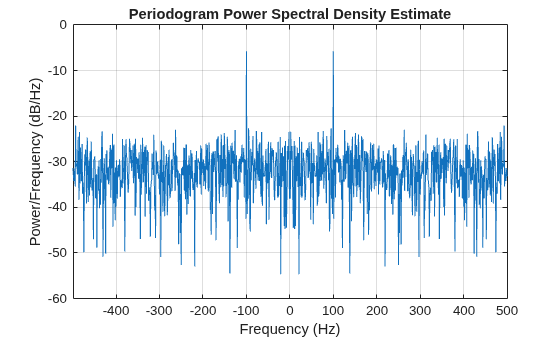
Generate a signal that consists of a 200 Hz sinusoid embedded in white Gaussian noise. The signal is sampled at 1 kHz for 1 second. The noise has a variance of 0.01². Reset the random number generator for reproducible results.
rng("default")

Fs = 1000;
t = 0:1/Fs:1-1/Fs;
N = length(t);
x = sin(2*pi*t*200) + 0.01*randn(size(t));
Use the FFT to compute the power spectrum of the signal, normalized by the signal length. The sinusoid is in-bin, so all the power is concentrated in a single frequency sample. Plot the one-sided spectrum. Zoom in to the vicinity of the peak.
q = fft(x,N);
ff = 0:Fs/N:Fs-Fs/N;

ffts = q*q'/N^2
ffts =
0.4997
ff = ff(1:floor(N/2)+1);
q = q(1:floor(N/2)+1);

stem(ff,abs(q)/N,"*")
axis([190 210 0 0.55])
Use periodogram to compute the power spectrum of the signal. Specify a Hann window and an FFT length of 1024. Find the percentage difference between the estimated power at 200 Hz and the actual value.
wind = hann(N);

[pun,fr] = periodogram(x,wind,1024,Fs,"power");

hold on
stem(fr,pun)

periodogErr = abs(max(pun)-ffts)/ffts*100
periodogErr =
4.7349
Recompute the power spectrum, but this time use reassignment. Plot the new estimate and compare its maximum with the FFT value.
[pre,ft,pxx,fx] = periodogram(x,wind,1024,Fs,"power","reassigned");

stem(fx,pre)
hold off
legend(["Original" "Periodogram" "Reassigned"])
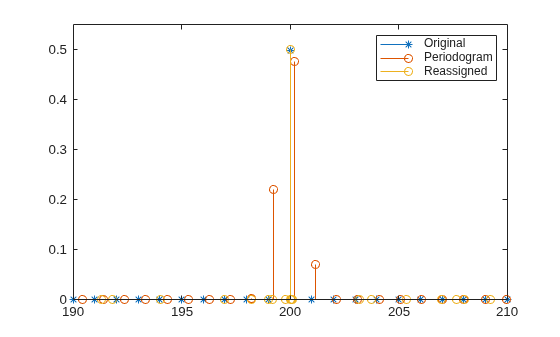
reassignErr = abs(max(pre)-ffts)/ffts*100
reassignErr =
0.0779
Estimate the power of sinusoid at a specific frequency using the "power" option.
Create a 100 Hz sinusoid one second in duration sampled at 1 kHz. The amplitude of the sine wave is 1.8, which equates to a power of 1.8²/2 = 1.62. Estimate the power using the "power" option.
fs = 1000;
t = 0:1/fs:1-1/fs;
x = 1.8*cos(2*pi*100*t);
[pxx,f] = periodogram(x,hamming(length(x)),length(x),fs,"power");
[pwrest,idx] = max(pxx);
fprintf("The maximum power occurs at %3.1f Hz\n",f(idx))
The maximum power occurs at 100.0 Hz
fprintf("The power estimate is %2.2f\n",pwrest)The power estimate is 1.62
Generate 1024 samples of a multichannel signal consisting of three sinusoids in additive white Gaussian noise. The sinusoids frequencies are , , and rad/sample. Estimate the PSD of the signal using the periodogram and plot it.
rng("default")
N = 1024;
n = 0:N-1;

w = pi./[2;3;4];
x = cos(w*n)' + randn(length(n),3);

periodogram(x)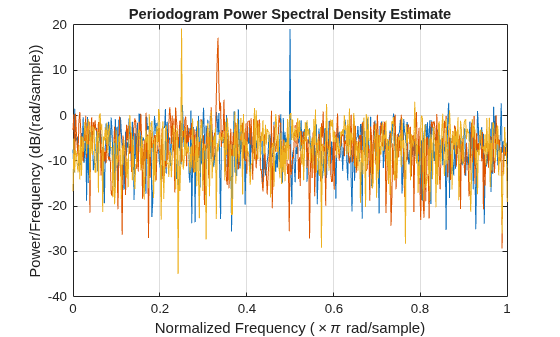
Examine the function myPeriodogram.m that returns the Modified Periodogram power spectral density (PSD) estimate of an input signal using a window. The function specifies a number of discrete Fourier transform points equal to the length of the input signal.
type myPeriodogramfunction [pxx,f] = myPeriodogram(inputData,window) %#codegen
nfft = length(inputData);
[pxx,f] = periodogram(inputData,window,nfft);
end
Use codegen (MATLAB Coder) to generate a MEX function.
The
%#codegendirective in the function indicates that the MATLAB® code is intended for code generation.The
-argsoption specifies example arguments that define the size, class, and complexity of the inputs to the MEX-file. For this example, specifyinputDataas a 1024-by-1 double precision random vector andwindowas a Hamming window of length 1024. In subsequent calls to the MEX function, use 1024-sample input signals and windows.To set a different name for the MEX function, use the
-ooption.To generate a code generation report, add the
-reportoption at the end of thecodegencommand.
codegen myPeriodogram -args {randn(1024,1),hamming(1024)}
Code generation successful.
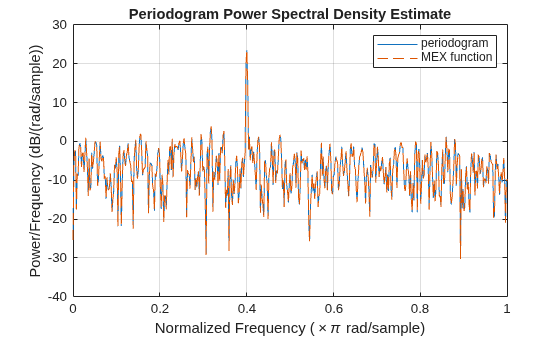
Compute the PSD estimate of a 1024-sample noisy sinusoid using the periodogram function and the generated MEX function. Specify a sinusoid normalized frequency of rad/sample and a Hann window. Plot the two estimates to verify that they coincide.
N = 1024;
x = 2*cos(2*pi/5*(0:N-1)') + randn(N,1);
periodogram(x,hann(N))
[pxMex,fMex] = myPeriodogram_mex(x,hann(N));
hold on
plot(fMex/pi,pow2db(pxMex),"--")
hold off
grid on
legend(["periodogram" "MEX function"])
Since R2026a
Plot the periodogram power spectral density (PSD) estimate and periodogram power spectrum for four signals in the specified target axes and panel containers.
Create four oscillating signals with a sample rate of 10 kHz for three seconds.
Fs = 10e3;
t = 0:1/Fs:3;
x1 = sinc(Fs/2.5*(t-mean(t)));
x2 = sum(cos(2*pi*600*[1 3 5 7]'.*t),1) + randn(size(t))/1e4;
x3 = exp(1j*pi*sin(4*t)*Fs/10);
x4 = chirp(t,Fs/10,t(end),Fs/2.5,"quadratic");
Plot Periodogram PSD Estimate and Power Spectrum in Target Axes
Create two axes in the southwestern and northeastern corners of a new figure window.
fig = figure;
ax1 = axes(fig,Position=[0.09 0.1 0.60 0.45]);
ax2 = axes(fig,Position=[0.50 0.7 0.47 0.25]);
Plot the periodogram PSD estimate and power spectrum of the signals x1 and x2 in the southwestern and northeastern axes of the figure, respectively. Use a Kaiser window and 512 DFT points.
g = kaiser(length(t),5);
nfft = 512;

periodogram(x1,g,nfft,Fs,Parent=ax1)
periodogram(x2,g,nfft,Fs,"power",Parent=ax2)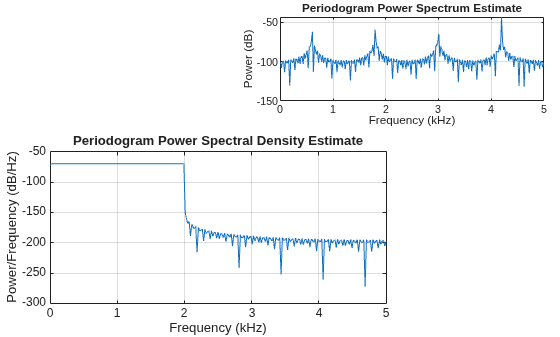
Plot Periodogram PSD Estimate in Target UI Axes
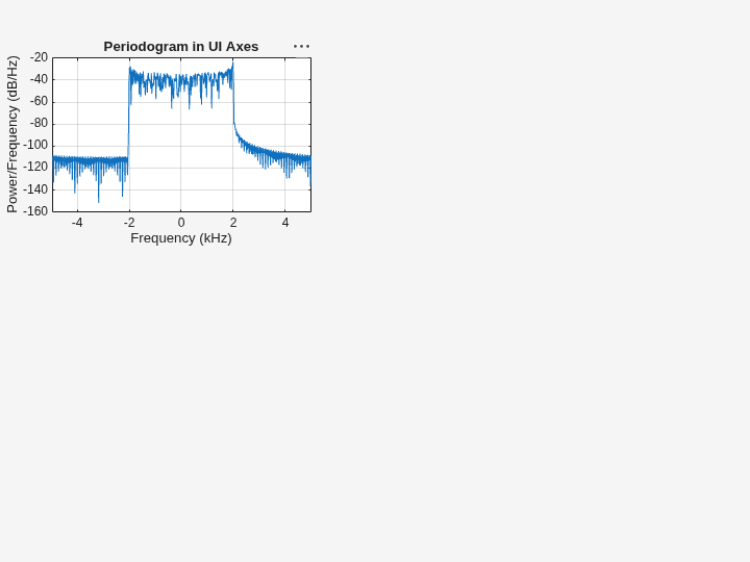
Create an axes in the northwestern corner of a new UI figure window.
uif = uifigure(Position=[100 100 720 540]);
ax3 = uiaxes(uif,Position=[5 305 300 200]);
Plot the periodogram PSD estimate of the signal x3 on the figure axes. Display the frequencies centered at 0 kHz.
periodogram(x3,g,nfft,Fs,"centered",Parent=ax3)
title(ax3,"Periodogram in UI Axes")
Plot Reassigned Periodogram PSD Estimate in Target Panel Container
Add a panel container in the southeastern corner of the UI figure window.
p = uipanel(uif,Position=[300 5 400 325], ...
    Title="Periodogram in Panel Container", ...
    BackgroundColor="white");
Plot the reassigned periodogram PSD estimate of the signal x4 on the panel container.
periodogram(x4,g,nfft,Fs,"reassigned",Parent=p)
Input Arguments
Output Arguments
More About
References
[1] Auger, François, and Patrick Flandrin. "Improving the Readability of Time-Frequency and Time-Scale Representations by the Reassignment Method." IEEE® Transactions on Signal Processing. Vol. 43, May 1995, pp. 1068–1089.
[2] Fulop, Sean A., and Kelly Fitz. "Algorithms for computing the time-corrected instantaneous frequency (reassigned) spectrogram, with applications." Journal of the Acoustical Society of America. Vol. 119, January 2006, pp. 360–371.

